VVDs, Project Ice, vRNI & NSX – Summary Of My Breakout Sessions From Day 1 at VMworld 2016 US –

Capture

Quick post to summerise the sessions I’ve attended on day 1 at @VMworld 2016 and few interesting things I’ve noted. First up are the 3 sessions I had planned to attend + the additional session I managed to walk in to.

Breakout Session 1 – Software Defined Networking in VMware validated Designs

  • Session ID: SDDC7578R
  • Presenter: Mike Brown – SDDC Integration Architect (VMware)

This was a quick look at the VMware Validated Designs (VVD) in general and the NSX design elements within the SDDC stack design in the VVD. If you are new to VVD’s and are typically involved in designing any solutions using the VMware software stack, it is genuinely worth reading up on and should try to replicate the same design principles (within your solution design constraints) where possible. The diea being this will enable customers to deploy robust solutions that have been pre-validated by experts at VMware in order to ensure the ighest level of cross solution integrity for maximum availability and agility required for a private cloud deployment. Based on typical VMware PSO best practices, the design guide (Ref architecture doc) list out each design decision applicable to each of the solution components along with the justification for that decision (through an explanation) as well as the implication of that design decision. An example is given below

NSX VVD

I first found out about the VVDs during last VMworld in 2015 and mentioned in my VMworld 2015 blog post here. At the time, despite the annoucement of availability, not much content were actually avaialble as design documents but its now come a long way. The current set of VVD documents discuss every design, planning, deployment and operational aspect of the following VMware products & versions, integrated as a single solution stack based on VMware PSO best practises. It is based on a multi site (2 sites) production solution that customers can replicate in order to build similar private cloud solutions in their environments. These documentation set fill a great big hole that VMware have had for a long time in that, while their product documentation cover the design and deployment detail for individual products, no such documentaiton were available for when integrating multiple products and with VVD’s, they do now. In a way they are similar to CVD documents (Cisco Validated Designs) that have been in use for the likes of FlexPod for VMware…etc.

VVD Products -1

VVD Products -2

VVD’s generally cover the entire solution in the following 4 stages. Note that not all the content are fully available yet but the key design documents (Ref Architecture docs) are available now to download.

  1. Reference Architecture guide
    1. Architecture Overview
    2. Detailed Design
  2. Planning and preperation guide
  3. Deployment Guide
    1. Deployment guide for region A (primary site) is now available
  4. Operation Guide
    1. Monitoring and alerting guide
    2. backup and restore guide
    3. Operation verification guide

If you want to find out more about VVDs, I’d have a look at the following links. Just keep in mind that the current VVD documents are based on a fairly large, no cost barred type of design and for those of you who are looking at much smaller deployments, you will need to exercise caution and common sense to adopt some of the recommended design decisions to be within the appplicable cost constraints (for example, current NSX design include deploying 2 NSX managers, 1 integrated with the management cluster vCenter and the other with the compute cluster vCenter, meaning you need NSX licenses on the management clutser too. This may be an over kill for most as typically, for most deployments, you’d only deploy a single NSX manager integrated to the compute cluster)

As for the Vmworld session itself, the presenter went over all the NSX related design decisions and explained them which was a bit of a waste of time for me as most people would be able to read the document and understand most of those themselves. As a result I decided the leave the session early, but have downloaded the VVD documents in order to read throughly at leisure. 🙂

Breakout Session 2 – vRA, API, Ci Oh My!

  • Session ID: DEVOP7674
  • Presenters

vRA Jenkins Plugin

As I managd to leave the previous session early, I manage to just walk in to this session which had just started next door and both Kris and Ryan were talking about the DevOps best practises with vRealize Automation and vrealize Code Stream. they were focusing on how developpers who are using agile development that want to invoke infrastructure services can use these products and invoke their capabilities through code, rather than through the GUI. One of the key focus areas was the vRA plugin for Jenkins and if you were a DevOps person of a developper, this session content would be great value. if you can gain access to the slides or the session recordings after VMworld (or planning to attend VMworld 2016 Europe), i’d highly encourage you to watch this session.

Breakout Session 3 – vRealize, Secure and extend your data center to the cloud suing NSX: A perspective for service providers and end users

  • Session ID: HBC7830
  • Presenters
    • Thomas Hobika – Director, America’s Service Provider solutions engineering & Field enablement, vCAN, vCloud Proviuder Software business unit (VMware)
    • John White – Vice president of product strategy (Expedient)

Hosted Firewall Failover

This session was about using NSX and other products (i.e. Zerto) to enable push button Disaster Recovery for VMware solutions presented by Thomas, and John was supposed to talk about their involvement in designing this solution.  I didn’t find this session content that relevent to the listed topic to be honest so left failrly early to go to the blogger desks and write up my earlier blog posts from the day which I thought was of better use of my time. If you would like more information on the content covered within this sesstion, I’d look here.


Breakout Session 4 – Practical NSX Distributed Firewall Policy Creation

  • Session ID: SEC7568
  • Presenters
    • Ron Fuller – Staff Systems Engineer (VMware)
    • Joseph Luboimirski – Lead virtualisation administrator (University of Michigan)

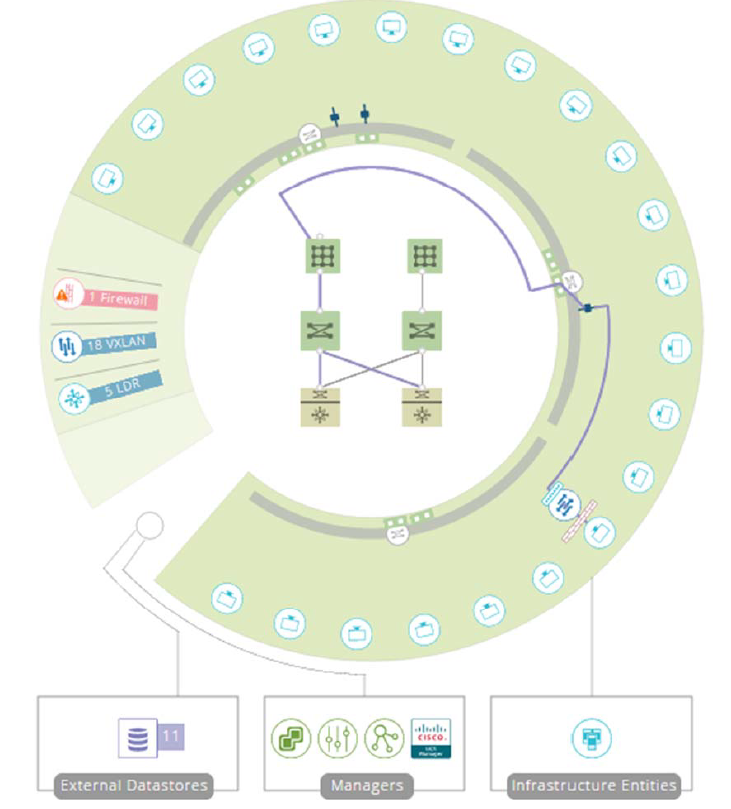
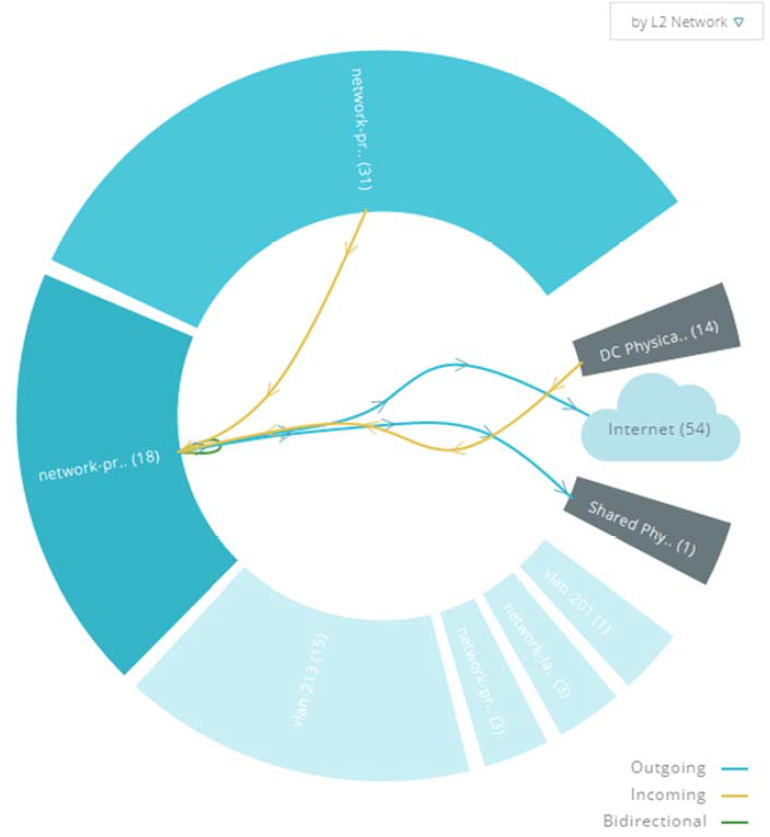
Fairly useful session focusing about NSX distributed firewall capability and how to effectively create a zero trust security policy on ditributed firewall using vairous tools. Ron was talking about various different options vailablle including manual modelling based on existing firewall rules and why that could potentially be inefficient and would not allow customers to benefit from the versatality available through the NSX platform. He then mentioned other approaches such as analysing traffic through the use of vRealize Network Insight (Arkin solution) that uses automated collection of IPFIX & NetFlow information from thre virtual Distributed Switches to capture traffic and how that capture data could potentialy be exported out and be manipulated to form the basis for the new firewall rules. He also mentioned the use of vRealize Infrastructure Navigator (vIN) to map out process and port utilisation as well as using the Flow monitor capability to capture exisitng communication channels to design the basis of the distributed firewall. The session also covered how to use vRealize Log Insight to capture syslogs as well.

All in all, a good session that was worth attending and I would keep an eye out, especially if you are using / thinking about using NSx for advanced security (using DFW) in your organisation network. vRealize Network Insight really caught my eye as I think the additional monitoring and analytics available through this platform as well as the graphical visualisation of the network activities appear to be truely remarkeble (explains why VMware integrated this to the Cross Cloud Services SaS platform as per this morning’s announcement) and I cannot wait to get my hands on this tool to get to the nitty gritty’s.

If you are considering large or complex deployment of NSX, I would seriously encourage you to explore the additional features and capabilities that this vRNI solution offers, though it’s important to note that it is licensed separately form NSX at present.
vNI         vNI 02


Outside of these breakout sessions I attended and the bloggin time in between, I’ve managed to walk around the VM Village to see whats out there and was really interested in the Internet Of Things area where VMware was showcasing their IOT related solutions currently in R&D. VMware are currently actively developing an heterogeneous IOT platform monitoring soluton (internal code name: project Ice). The current version of the project is about partnering up with relevent IOT device vendors to develop a common monitoring platform to monitor and manage the various IOT devices being manufacured by various vendors in various areas. If you have a customer looking at IOT projects, there are opportunities available now within project Ice to sign up with VMware as a beta tester and co-develop and co-test Ice platform to perform monitoring of these devices.

An example of this is what VMware has been doing with Coca Cola to monitor various IOT sensors deployed in drinks vending machines and a demo was available in the booth for eall to see

IOT - Coke

Below is a screenshot of Project Ice monitoring screen that was monitoring the IOT sensors of this vending machine.   IOT -

The solution relies on an Open-Source, vendor neutral SDK called LIOTA (Little IOT Agent) to develop a vendor neutral agent to monitor each IOT sensor / device and relay the information back to the Ice monitoring platform. I would keep and eye out on this as the use cases of such a solution is endless and can be applied on many fronts (Auto mobiles, ships, trucks, Air planes as well as general consumer devices). One can argue that the IOT sensor vendors themselves should be respornsible for developping these mo nitoring agents and platforms but most of these device vendors do not have the knowledge or the resources to build such intelligent back end platforms which is where VMware can fill that gap through a partship.

If you are in to IOT solutions, this is defo a one to keep your eyes on for further developments & product releases. This solution is not publicly available as of yet though having spoken to the product manager (Avanti Kenjalkar), they are expecting a big annoucement within 2 months time which is totally exciting.

Some additional details can be found in the links below

Cheers

Chan

#vRNI #vIN #VVD # DevOps #Push Button DR # Arkin Project Ice # IOT #LIOTA

VMworld 2016 US – Arrival & Summary From Day 0

Entrance

A very quick post on the my first day at VMWare VMworld 2016 US today and few tips for the attendees of the event.

As per explained my previous post, I’ve arrived at Vegas on Sunday afternoon as had planned after which felt like a looooong flight from London Heathrow, via Chicago to Vegas. I had been up since about 4am Sunday morning to catch the early flight and having not had much sleep on the flight (doesn’t work for me), I managed to get to my hotel by around 2pm. And unfortunately due to sheer number of guests arriving (mostly VMworld guests form what I could see), I then spent the next 2 & 1/2 hours simply queuing at the check-in desk which really didn’t help.

Anyhow, after check-in -> Shower, I decided to have a quick shower and go over to the event venue (its a short cab ride away from my hotel) in order to register and collect my badge before the morning rush on the event’s public opening day on Tuesday which went smoothly as been the case at every other VMworld event I’ve attended.

After the registration, it is typical that you go to collect your official VMworld back pack and having picked up this years, I have  to say I’m not impressed. it looks a little tacky compared to previous years and slightly on the cheaper side when it comes to the build quality etc. So I’m thinking that I’d stick to using the last years bag myself and give the new one away to a colleague / customer who might appreciate it more than I would.

Bag comparison

After collecitng the bag, I ventured out to the Solutipons Exchange. Solutions Exchange is where all the VMware partners (other vendors) have their exhibitoion booths that showcase all of their product and solution offerings that typically go hand in hand with VMware (and competitive offerings in some cases like Nutanix).

In the solutions exchange, I had a brief look around, spoke to few vendors after which I moved on to go find my fellow VMUG members at the VMUG party at house of Blues with a live band to have few drinks and catch up. Well, sure I had some drinks but didn’t really see many that I knew as it turned out most of the attendees were form all the US VMUG’s whom I’d never met 🙂

IMG_5684

After couple of drinks and some food there, I was feeling pretty tired given the extra long day I’d had by then and decided to go back to my hotel for getting this post out and catching up on some sleep. I decided to take the tram from the venue (Mandalay bay hotel) which takes you all the way to Luxor hotel & Casino which was a short walk away from my hotel. As I was walking over one of the flyovers, I did manage to get a nice view of the famous Vegas strip too which looks full of life at night (below) though my priority was just getting back my air conditioned room pronto as I’d had enough of the heat by this time (note to myself: no more walking between hotels)

IMG_5685


Cheers

Chan


#VMworld 2016 #Day 0

VMworld 2016 US – Key Announcements From Day 1

Pat gelsinger

So the much awaited VMworld 2016 US event kicked off today amongst much fanfare and I was lucky to be one of them there at the event. Given below are the key highlights from the day 1 general session & the key annoucements made by VMware CEO Pat Gelsinger. I’ve highlighted the key items.

Theme of this years VMworld is Be Tomorrow. This is quite fitting as technology today defines the tomorrow for the world and we as the IT community plays a key part in this along with vendors like VMware who defines / invent most of those technologies.

Pat mentioned that for VMware and their future direction, the Cloud is key. Both Public and Private cloud are going to define many IT requirements of tomorrow which I fully agree with and VMware’s aim appears to be to move away from the traditional vSphere based compute virtualisation to become a facilitator of cross cloud workload mobility and management.

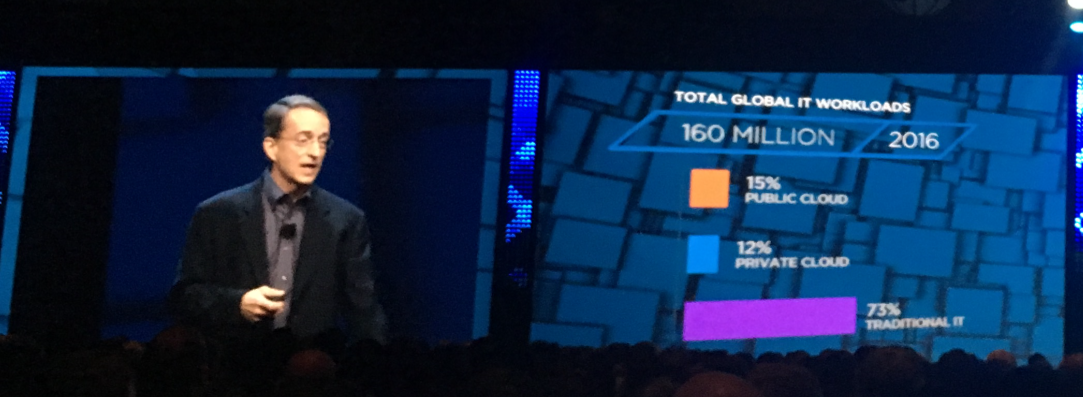
He also discussed the status of where the current public and private cloud adoption is at, which is presently heavily biased towards the public cloud rather than private cloud adoption, which inharently is quite difficult to retro fit to a legacy enviornment based on my experience too. Based on VMware research and market analytics, thre current IT platform adoption is split as below

  • Public Cloud = 15%
  • Private Cloud = 12%
  • Traditional IT = 73%

Current Cloud Split

According to Pat it will not be around 2021 that the public Vs private cloud usage adoption achieve similar levels and by 2030, they expect the adoptoin rates to be (approximately) as follows

  • Public Cloud =52%
  • Private Cloud = 29%
  • Traditional IT = 19%

From then, the tone shifted to look at VMware’s role in this evolving market. It is pretty obvioius that VMware as a vendor, been diversifying their product positioning to rely less on the core vSphere stack but to focus more on the Cloud management and other software defined offerings for the last few years. This was made possible through the use of vSphere + NSX + VSAN for the SDDC for those who wanted a traditional IT environment or a private cloud platform with vRealize Suite sat on top to provide a common management and monitoring platform (Cloud Management Portal). These have been quite popular and some key highlights mentioned were,

  • vSphere the market leader in Virtualisation – Software Defined Compute
  • VSAN now has over 5000 fee paying customers & growing – Software Defined Storage
  • NSX has 400% YoY growth in adoption – Software Defined Networking
  • vRealize Suite is the most popular Cloud management portal in the industry

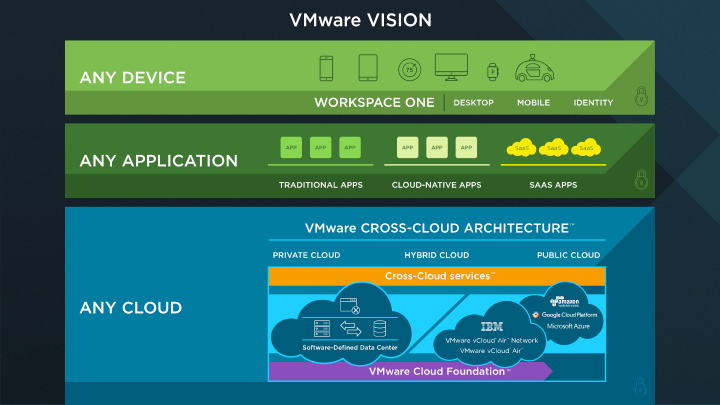
Todays main annoucement brings these solutions together in to VMware Cloud Foundation with Cross Cloud Services support. Cross Cloud Architecture annouced as a technical preview today effectively focuses on centralizing the followings across various deifferent private and public cloud platforms

  • Management,
  • Operations
  • Security
  • Networking (the most important one for me)

This tech preview platform initially will support Publci clouds (Azure, AWS, Google Cloud, vCloud Air) as well as vCloud Air Network Partners and private cloud instances

Chris-Wolf-Day-1-Recap-image

The below graphic annouces the Corss cloud services model and the solution proposition quite well. One of the key interesting part of this annoucement is that throuh the IBM partnership, these cross cloud services will be made available as SaS offering (Software as a Service) which require no local installation or PS heavy deployment of management and monitoring components on premise. It would be interesting to see the details of what this means,  and cannot wait to get my hands on the tools once available to look deeper in to details and what that means for the average customers.

2016-08-29_13-15-50

Based on Pat’s description, Cross Cloud Services solution is designed to facilitate moving of applications between private and various public clouds with minimal disruption / effort for the customers.

They also showed a demo of this being in action which was really really impressive. It is pretty obvious that for true cross cloud connectivity and flexbility when it comes to moving applications..etc, one of the key blockers has been the networking restrictions such as the lack of easily available L2 adjacency….etc. VMware are in a prime position to address this through the SDN platform they have in NSX and the demo showed clearly the NSX integration with AWS that automatically deployed an L2 Edge gateway (software) devices in front of AWS Virtual datacenter to offer L2 connectivity back to customers on premise to extend the LAN capability as a key facilitator to enable being able to move a workload from AWS to On-Premise and back. (Think WAN is transformed in to an extended LAN with NSX). I’ve always seen this coming and also discussed with my customers various other posibilities like this that NSX brings on to the table and its nice to see that these capabilities are now being integrated in to othermanagement and monitoring platforms to proviude a true single pane of glass solution for multi cloud management.

The solution demo also included the Arkin integration of the same platfrom (VMware aquired Arkin recently) and it brings the security monitoring and anlytics capability to the platform which is totally awesome..!! I’ve already seen the extensively capability of visualizing networking flow and security contexts of vRealize Network Insight (rebranded Arkin solution) previously but its really good to see that bieng integrated to this Software as a Sevrice Offering. This solution also include traffic encryption capability, even within a public cloud platform like Amazon that you do not get by default which would go a long way towards deploying workloads siubject to regulatory compliance on public cloud platforms.

These new annoucements form the basis of the VMwares vision of Any device (through the use of Airwatch), Any application (through the use of Workspace one) and any cloud (now available through the Cross Cloud arhitecture) message that enable their customers to simply their modern day IT operations increse agility, efficiency and productivity.

Cross Cloud

Slide credit goes to VMware

You can find more details in the following links

Cheers

Chan

#NSX #vSphere #VSAN #CrossCloudServices #VmwareCloudFoundation

vRealize Infrastructure Navigator not appearing in the Web Client

I was playing around deploying the latest version of the vRealize infrastructure Navigator (5.8.6.230 – build 3923091) in my HomeLab (vSphere 6.5 with VCSA as the vCenter) and noticed that after the deployment of the VIN appliance and successfully starting it up, the Infrastructure Navigator option was not appearing within the home screen of the vSphere web client.

Upon some investigation, it turned out that the VIN plugin was not correctly downloaded to the web client so you need to manually check for new plugins to install. To achieve this, follow the process below

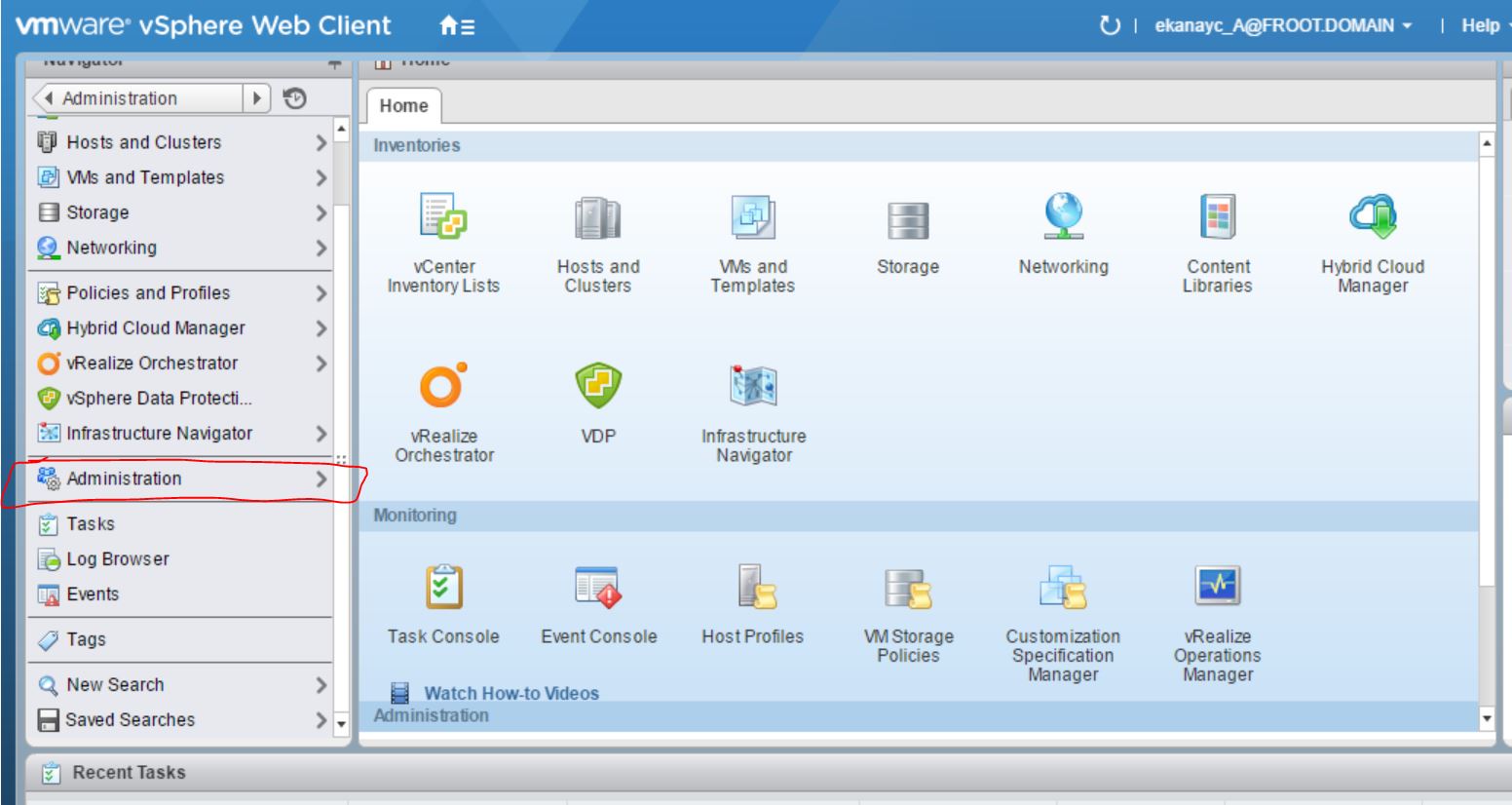
  1. In the Web Client, go to Home -> Administration -> Client plug-ins (under Solutions drop down menu on left) and verify that the Infrastructure Navigator plugin is not available
  2. Click the check for new plugins link on the top left. A small pop up box appears on the bottom right notifying you of the new plugin check-in action. 2
  3. Click on the Go to the event console link that’s on this pop up box to see the event updates and verify that the task is running to check for new plugins 3
  4. Wait until new plugin check is completed and is successful.   4
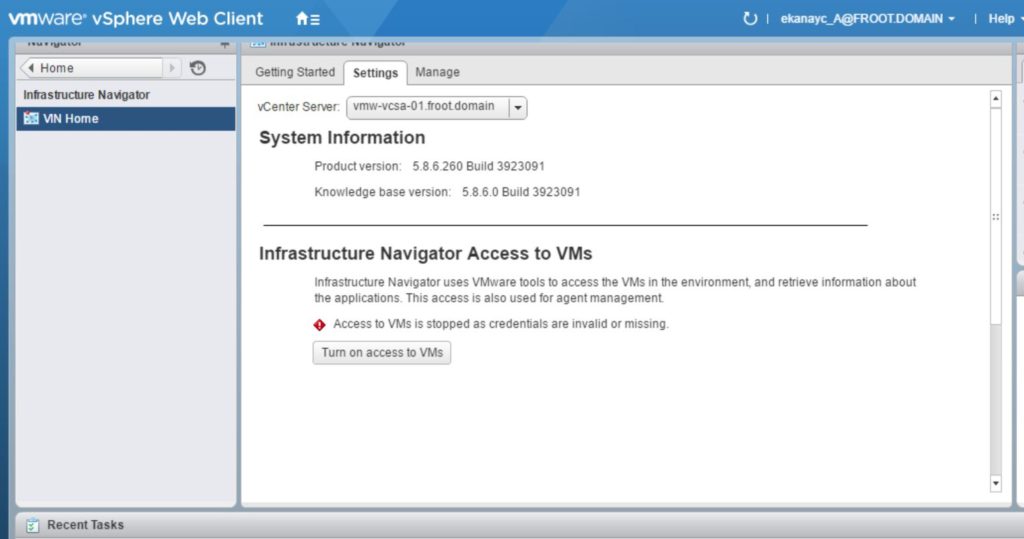
  5. Log off, and lock back in to vSphere web client to see the Infrastructure Navigator option appearing on the home screen so that you can go in to it and configure the VM discovery  5 6

Cheers

Chan

Heading to #VMworld 2016 Vegas

Capture 309728B09D1231310A4501F778AC28B1

I am a regular attendee of the VMware VMworld and have continuously attended each of the last 4 years VMworld events in Europe, as an ordinary attendee like most others, mainly thanks to my employer who understands the importance of such events. This year however, there’s a little change of plans. I’ve been lucky enough to receive a free blogger pass to attend the VMworld 2016 event in the US from VMware. VMworld 2016 US event is being held in Vegas, in the Mandalay Bay hotel and conference center which is pretty awesome…!

I’ve never been to Vegas so little excited to be heading over there but to be really honest, I’m more excited about being able to attend the US version of VMworld. Having done European VMworld event over the last few years, they’ve all been great but the contents & the new product announcements have been by and large the same as in the US version which usually takes place before European event (So most of the news / updates / announcements you here in VMworld Europe are already somewhat public knowledge). However this time around, I will be one of the first to hear about them as they are being announced which is great.

And its the first time I’ve been selected to receive a blogger pass by VMware. Blogger passes are issued to a handful of current VMware vExperts (only 50 issued in total for the US event) so I was very lucky there. Its usually given to active community bloggers who take the time out to evangelise technology and happy to blog about it for the good of the community. I do this anyway whenever I attend VMworld where I summarize each of my day there and mention any exciting topics / updates / vendors I’ve come across or things I’ve learned. So I’d expect to do the same this year too and aiming to get a summary blog post out at the end of each day to cover the news & the activities of the day.

While the blogger pass covered the cost of the event, VMware doesn’t cover the other expenses such as flights and hotels… Thankfully, my employer, Insight has stepped up there which was great.

Given below is a summary of my plan during the event. It would be good to meet my fellow vExperts / customers / techies / community members while I’m there, perhaps over few beers. Please do come say hi if you see me or hit me up on twitter (@s_chan_ek)…etc.

Itineraries

Most people will typically travel either few days earlier or stay behind few days after the event to explore the city..etc but unfortunately due to cricket commitments where I play league cricket on every Saturday, I’m reduced to being there for the exact event duration only. As such, my itineraries are as follows

  • Travelling out: Sunday the 28th of August: Travel from London Heathrow via Chicago to Vegas (United Airlines)
  • Accommodation: I will be staying in the MGM Grand hotel which is a little walk away from the event location (Mandalay Bay Hotel & Conference Center)
  • Travelling back: Friday the 2nd of Sept, from Vegas via Montréal back to London Heathrow (Air Canada)


Planned sessions

Anyone travelling to VMworld are advised to use the Schedule Builder beforehand and schedule any breakout sessions you want to attend. I’ve always done this in the past and have tried the same this year. However, despite attempting to book many interesting breakout sessions and workshops on the same day the Schedule builder went live, most of the really good ones were already full. So I’m guessing the demand for the event in the US is far higher than the one in Europe and I’m expecting to see lot more crowd that at the European VMworld.

The sessions I’ve managed to book to attend are as follows. Some of them are new subjects while most others are more of a refresher from previous knowledge for me. Having learnt from the previous VMworlds, I’ve been careful not to book session after session and allow enough time for blogging in between as well as hall crawl and networking with people which, arguably are far more important that attending breakout sessions or workshops which lot of people, especially newbies don’t realise.

  • Monday the 29th of August – I have the following sessions I’ve scheduled so far. Some may change depending on when I managed to get in to some other sessions I’ve had to wait list for.
    • 11am-12pm: Software-Defined Networking in VMware Validated Designs [SDDC7587]
    • 1pm-2pm: Virtualize, Secure, and Extend Your Data Center to the Cloud Using NSX: A Perspective for Service Providers and End Users [HBC7830]
    • 2pm-3pm: Introducing Virtual SAN for VMware Photon: The Best HCI Platform for Containers and Cloud-Native Applications [STO8256]
    • 3pm-4:30pm: VMware NSX Distributed Firewall with Micro-Segmentation Workshop [ELW-1703-USE-2]


  • Tuesday the 30th of August
    • 11am-12pm: Understanding the Availability Features of Virtual SAN [STO8179]
    • 12pm-1:30pm: vSphere Integrated Containers Workshop [ELW-1730-USE-1] – Wait Listed
    • 2pm-3pm: How to Deploy VMware NSX with Cisco Infrastructure [NET8364]
    • 4pm-5pm: Containers for the vSphere Admin [CNA7522]
    • 5pm-6pm: The Architectural Future of Network Virtualization [NET8193R]


  • Wednesday the 31st of August
    • 9:30am-11am: Realize Automation 7 Basics Workshop [ELW-1721-USE-1] – Wait listed
    • 11am-12pm: How to Use Machine Learning to Increase Application Availability [INF9608-SPO]
    • 1pm-2pm: PowerNSX and PyNSXv: Using PowerShell and Python for Automation and Management of VMware NSX for vSphere [NET7514]
    • 2pm-3pm: Implementing Self-Service Storage Provisioning with vRealize Automation XaaS [SDDC9456-SPO]
    • 3:30pm-4:30pm: Building Cloud Native Architectures [CNA9926]


  • Thursday the 1st of September
    • 12pm-1pm: VMware Certificate Management for Mere Mortals [INF8631]
    • 1:30pm-2:30pm: Winter Is Coming. Are You Dev/Ops Ready? Instant Clone Is! [INF8396]


Other events

Usually there are many other vendor and vExpert events that also take place, out of hours to discuss products as well as networking with people. There is a list of such activities published here and outside of the normal VMworld welcome reception and the VMworld party, I will probably attend the below (I may have to cancel some last min due to exhaustion & last min change of plans…etc :-))

  • Sunday the 28th of August 7:30-9:30pm: 2016 VMUG member party @ House of Blues – Mandalay Bay, 3950 S Las Vegas Boulevard
  • Monday the 29th of August 9pm-11pm: Trace3 Annual VMWorld After Party @ Daylight Beach Club, Mandalay Bay, 3950 S Las Vegas Blvd, Las Vegas, Nevada, 89119
  • Tuesday the 30th of August 7pm -10pm: vExpert 2016 Las Vegas reception @ The Mob Museum, 300 Stewart Avenue, Las Vegas, NV 89101


About VMworld Event

As mentioned earlier, I’ve attended VMworld Europe edition over the last 4 years and it has been such a good event to attend given the amount of knowledge, insides, tips you can gather, seeing the variety of the VMware echo system partners out there and their solutions and most importantly meeting and being able to network with people that you’d otherwise never get the opportunity to (like product managers and engineers). And usually its such a well organised event and having attended other similar events such as NetApp Insight, Cisco Live and HPe TSS & Ambassador events, I can say without a shadow of a doubt that none of them has been as good, well organised, well attended or useful to me as an attendee as VMworld, period….! If you are a VMWare customer or a partner, I’d highly encourage you to attend somehow. (use the link here)

VMware NSX vExpert 2016

vExpert-NSX-Badge

Its been a while since I’ve managed to post anything due to various reasons but most of them revolved around being just too busy. Anyhow I’m planning to change that with some new exciting posts over the next few weeks & months, starting with this one, which was a little overdue.

On Friday the 17th of June, I was notified by VMware that I have been selected as one of the first ever NSX vExperts (there’s only 115 in total globally). NSX vExpert program is a sub program off the general VMware vExpert program (their global evangelism and advocacy program) which has now been running for some years (I’ve been a vExpert in 2014 and again in 2016). The NSX vExpert program is however quite new, only started this year for the first time. VMware have only picked the NSX vExperts from the current pool of general vExperts and to be short listed within those 115 people is quite an honour.

As a part of the NSX vExperts program, we are entitled to a number of benefits such as NFR license keys for full NSX suite, access to NSX product management, exclusive webinars & NDA meetings, access to preview builds of the new software and also get a chance to provide feedback to the product management team on behalf of our clients which is great.

NSX is a truly great product that lets you bring the operational model of the VM to your network in order to maximise its utilisation while increasing the efficiency by many-folds and lots of customers who are looking at automation and operation in their data center are looking at NSX as the software layer to underpin all such requirements. New functionalities keep coming with each new version, and I’m sure that will keep all of us NSX vExperts quite busy for the foreseeable future.


VMware VSAN 6.2 Performance & Storage savings

Just a quick post to share some very interesting performance stats observed on my home lab VSAN cluster (Build details here). The VSAN datastore is in addition to a few NFS datastores also mounted on the same hosts using an external Synology SAN.

I had to build a number of Test VMs, a combination of Microsoft Windows 2012 R2 Datacenter and 2016 TP4 Datacenter VMs on this cluster and I placed all of them on the VSAN datastore to test the performance. See below the storage performance stats during the provisioning (cloning from template) time. Within the Red square are the SSD drive performance stats (where the new VM’s being created) Vs Synology’s NFS mount’s performance  stats (where templates resides) in the Yellow box.

Provisioning Performance

Pretty impressive from all Flash VSAN running on a bunch of white box servers with consumer grade SSD drives (officially unsupported of course but works!), especially relative to the performance of the Synology NFS mounts (RAID1/0 setup for high performance), right??

Imagine what the performance would have been if this was on enterprise grade hardware in your datacentre?

Also caught my eye was the actual inline deduplication and compression savings immediately available on the VSAN datastore after the VM’s were provisioned.

Dedupe & Compression Savings

As you can see, to store 437GB of raw data, with a FTT=1 (where VSAN keeping redundant copies of each vmdk file), its only consuming 156GB of actual storage on the VSAN cluster, saving me 281GB of precious SSD storage capacity. Note that this is WITHOUT Erasure Coding RAID 5 or RAID 6 that’s also available with VSAN 6.2 which, had that been enabled, would have further reduced the actual consumed space more.

The point of this all is the performance and the storage savings available in VSAN, especially all flash VSAN is epic and I’ve seen this in my own environment. In an enterprise datacenter, All Flash VSAN can drastically improve your storage performance but at the same time, significantly cut down on your infrastructure costs for all of your vSphere storage environments. I personally know a number of clients who have achieved such savings in their production environments and each and every day, there seem to be more and more demand from customers for VSAN as their preferred storage / Hyper-Converged technology of choice for all their vSphere use cases.

I would strongly encourage you to have a look at this wonderful technology and realise these technical and business benefits (summary available here) for yourself.

Share your thoughts via comments below or feel free to reach out to discuss what you think via email or social media

Thanks

Chan

New VMware Product Availabilities – Now available to download

Update

VMware have just made a number of new product versions (mostly maintenance releases on few different products, including that of the much hyped VSAN 6.2) so a quick post to summarise the content that was released last night (15.03.2016)

  • VMware VSAN 6.2 – VMware VSAN 6.2 was officially announced in early February with a number of cool new features such as Erasure coding but unless you were a techie trying to download the software, you may have not known that it was not available for download despite being announced. That was until yesterday and the product is now available to download for every customer.


  • VMware vRealize Automation 7.0.1 now released and available for download
    • Release notes here
    • Product binaries here
    • Documentation here


  • VMware vRealize Orchestrator 7.0.1 is released and available to download
    • Release notes here
    • Product binaries here
    • Documentation here


  • vRealize Business for Cloud (Old ITBMS offering) is also released and available for grabs now
    • Release notes here
    • Product binaries here
    • Documentation here


  • vRealize Log Insight 3.3.1 is released and available to download
    • Release notes here
    • Product binaries here
    • Documentation here


  • vCloud Suite 7.0 is also released and available to download (here) – This includes all of the above new versions of products plus the exiting versions for vSphere Replication 6.1 + vSphere Data Protection 6.1.2 + vROPS 6.2.0a + vRealize Infrastructure Navigator 5.8.5

VMware All Flash VSAN Implementation (Home Lab)

I’ve been waiting for a while to be able to implement an all flash VSAN in my lab and now that VSAN 6.2 has been announced, I thought it would be time to upgrade my capacity disks from HDD’s to SSD’s and get cracking..! (note: despite the announcement, VSAN 6.2 binaries are NOT YET available to download. I’m hearing it would be available in a week or two on My VMware though so until then, mine is based on VSAN 6.1 – ESXi 6.0U1 binaries)

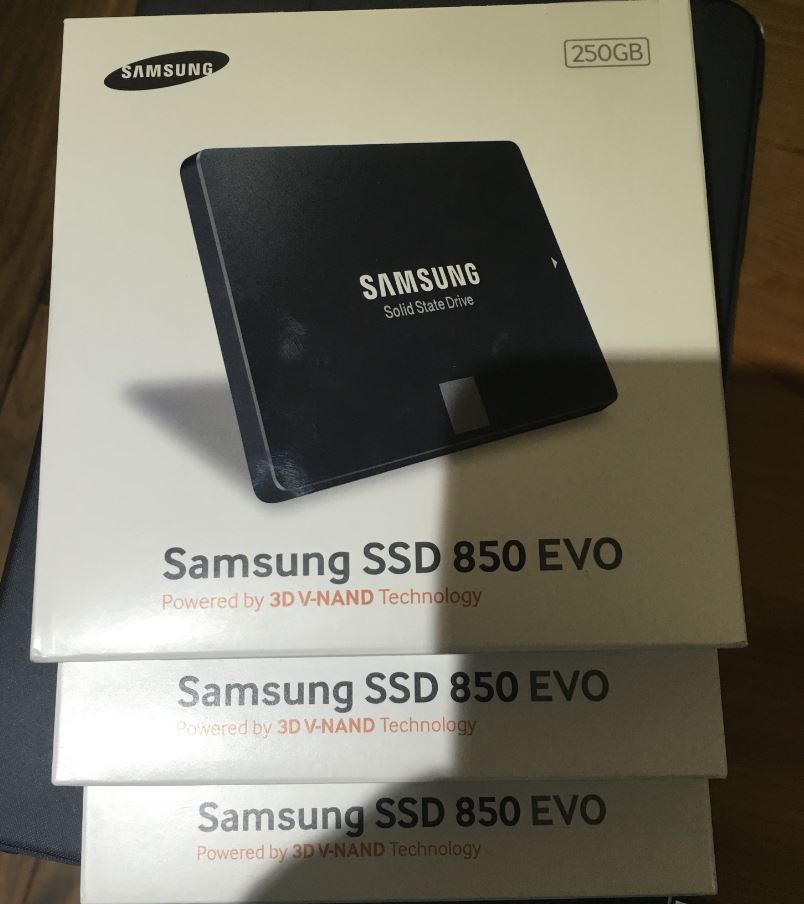
As I already had a normal (Hybrid) VSAN implementation using SSD+HDD in my management vSphere cluster, the plan was to keep the existing SSD’s as caching tier and replace the current HDD’s with high capacity SSD drives. So I bought 3 new Samsung 850 EVO 256GB drives from Amazon (here)                                       Capture

All Flash VSAN Setup

Given below are the typical steps involved in the processes to implement All Flash VSAN within the VMware cluster (I’m using the 3 node management cluster within my lab for the illustration below)

  1. Install the SSD drives in the server – This should be easy enough. If you are doing this in a production environment, you need to ensure that the capacity SSD’s (similar to all other components in your VSAN ready nodes)  are in the VMware HCL
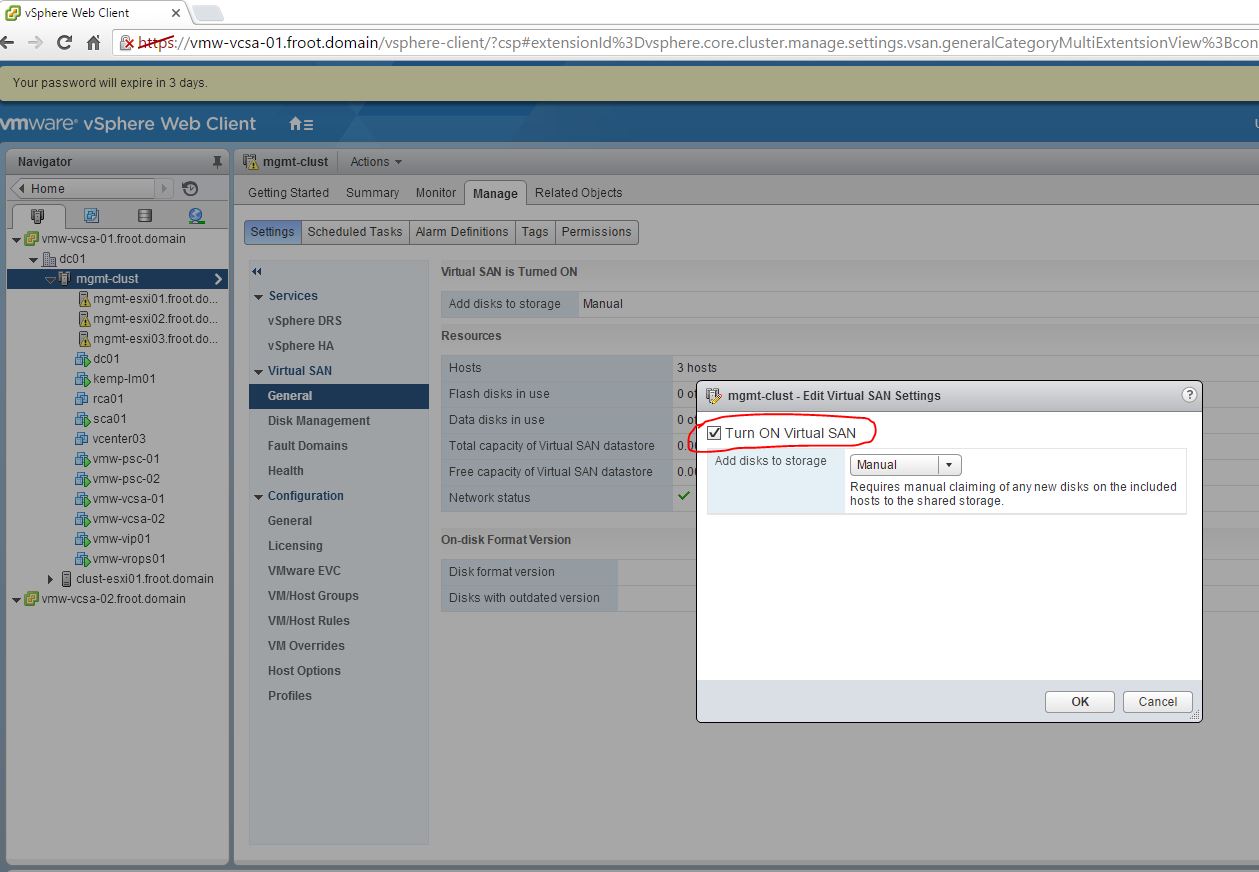
  2. Enable VSAN on the cluster – Need to be done on the web client      1 - Enable VSAN
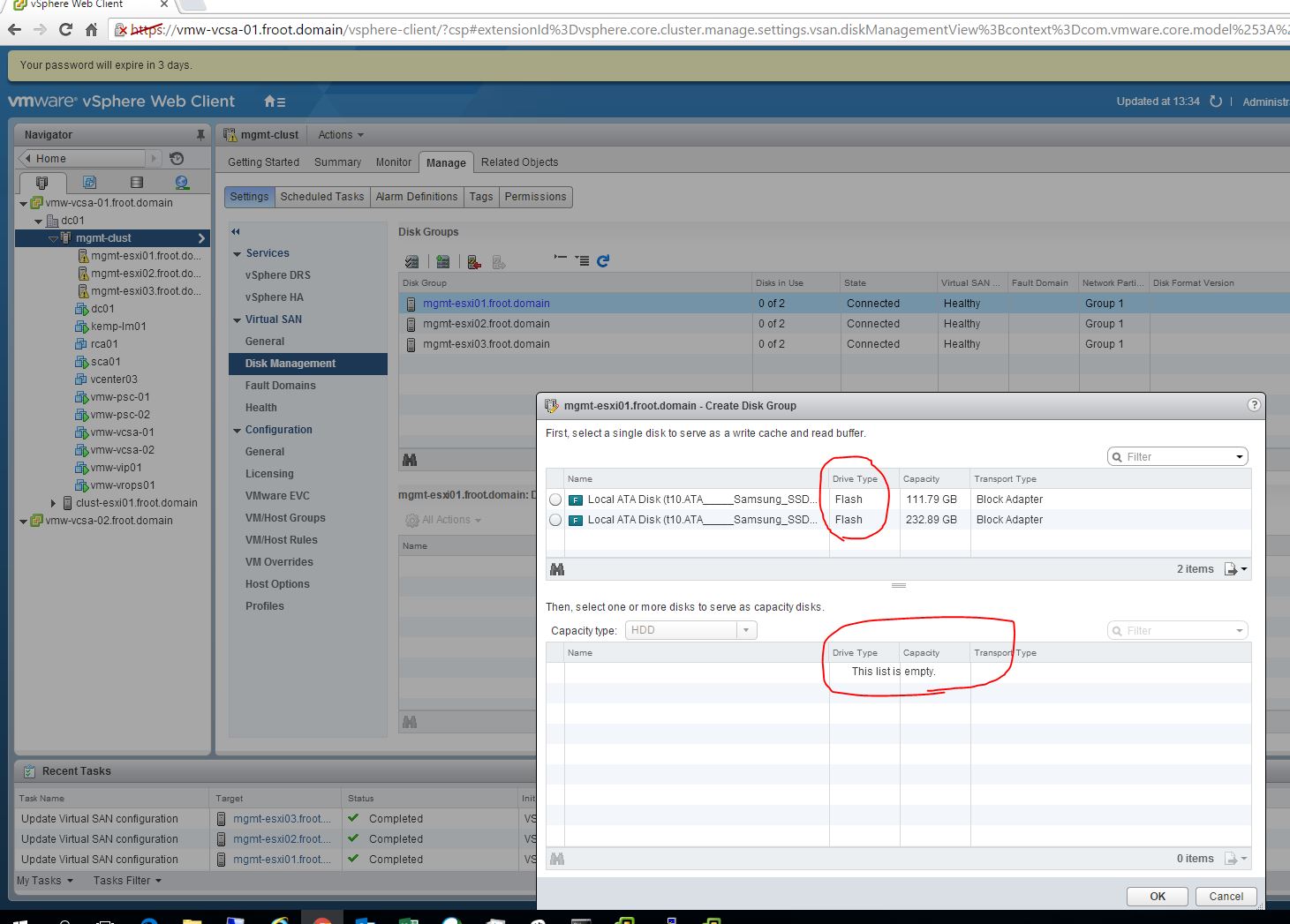
  3. Verify the new SSDs are available & recognised within the web client – All SSD’s are recognised as caching disks by default.              0 - Default disk assignment  2 - all caching
  4. Manually tag the required SSD drives as capacity disks VIA COMMANDLINE for them to be recognised as capacity disks within VSAN configuration – This step MUST be carried out using one the ways explained below and until then, SSD disks WILL NOT be available to be used as capacity disks within an all flash VSAN otherwise. (There currently is no GUI option on the web client to achieve this and cli must be used)
    1. Use esxcli command on each ESXi server
      1. SSH in to the ESXi server shell
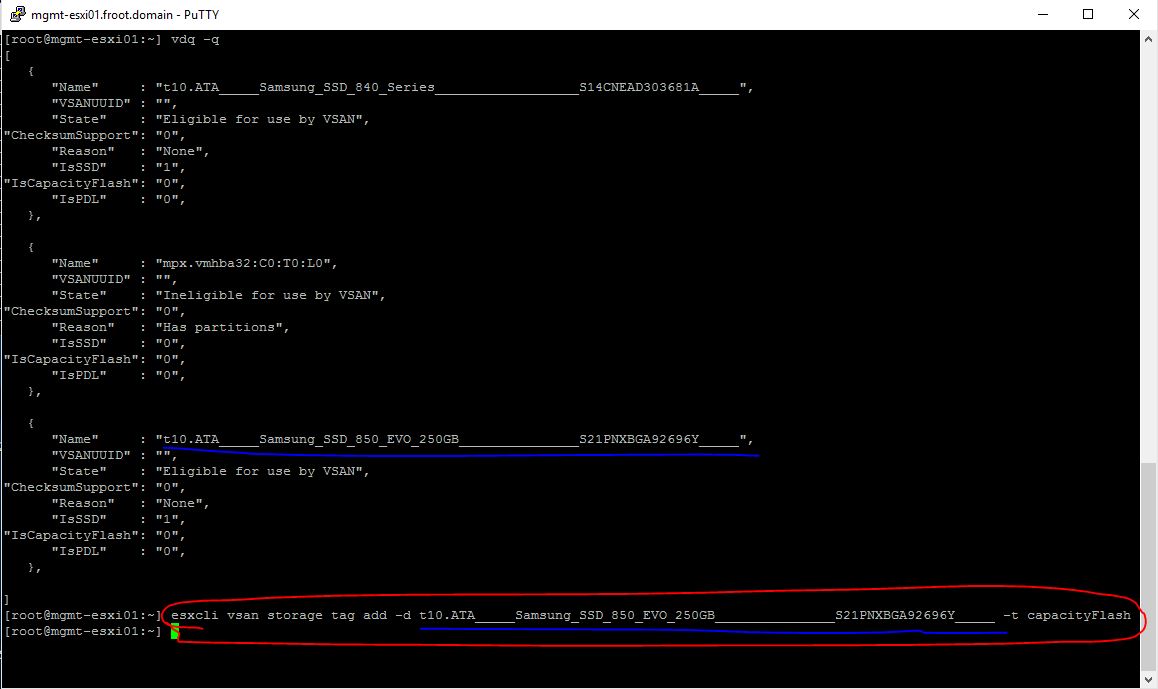
      2. Use the vdq -q command to get the T10 SCSI name for the capacity SSD drive (Also verify “IsCapacityFlash” option is set to 0) 3 SSH
      3. Use the “esxcli vsan storage tag add -d <SCSI T10 name of the disk> -t capacityFlash” command to mark the disk as capacity SSD.   4 ESXCLI
      4. Use the vdq -q command to query the disk status and ensure the disk is now marked as “1” for “IsCapacityFlash” 5 esxcli verify
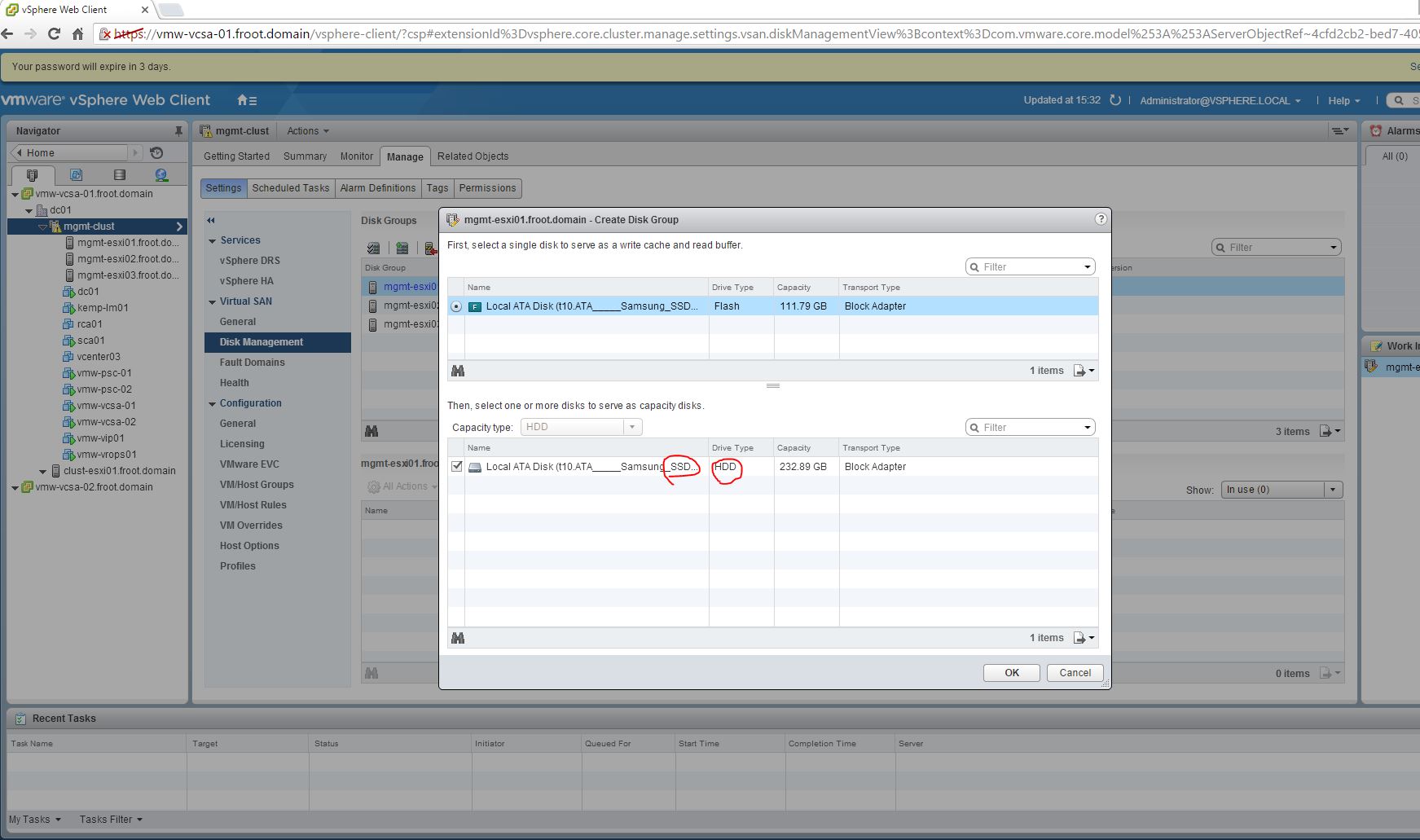
      5. If you now look at the Web client UI, the capacity SSD disk will now have been correctly identified as capacity (note the drive type changed to HDD which is somewhat misleading as the drive type is still SSD) 8.1 GUI
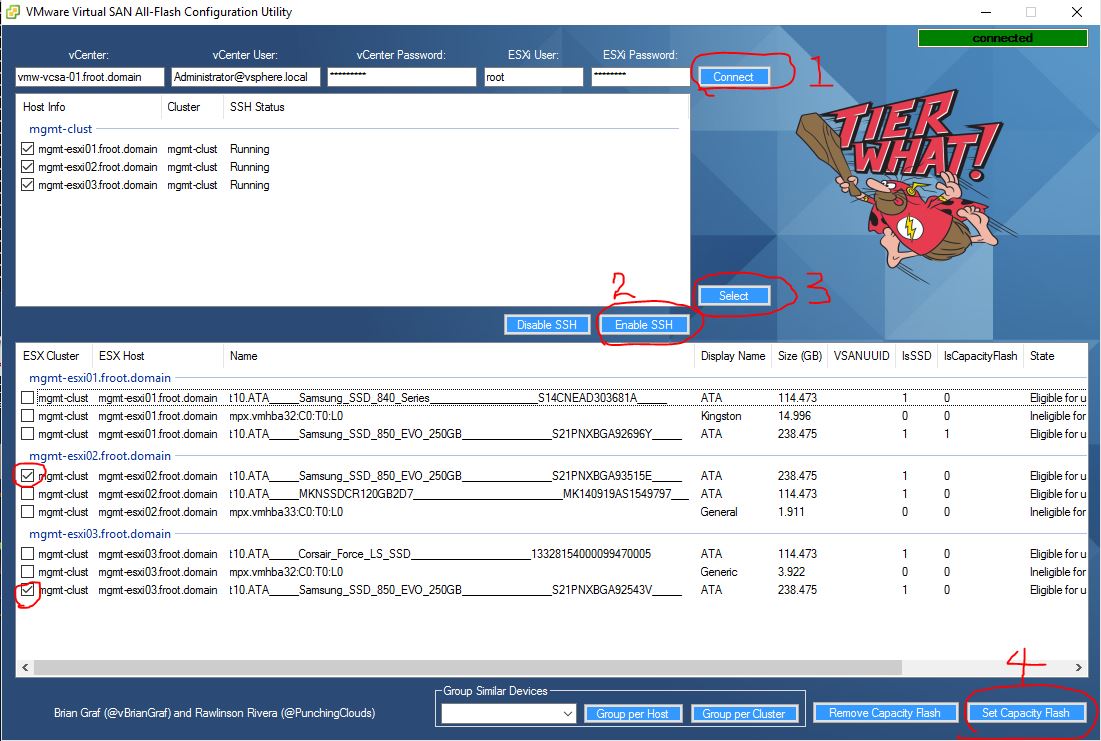
    2. Use the “VMware Virtual SAN All-Flash Configuration Utility” software – This is a 3rd party tool and not an officially supported VMware tool but if you do not want to manually SSH in to the ESXi servers 1 by 1, this software could be quite handy as you can bulk tag on many ESXi servers all at the same time. I’ve used this tool to tag the SSD’s in the next 2 servers of my lab in the illustration below. xx - Use VMware Virtual SAN all-flash configuration utility
  5. Verify capacity SSD across all hosts – Now that all the capacity SSD’s have been tagged as capacity disks, verify that the web client sees all capacity SSD’s across all hosts                                                9 Disk group manual
  6. Create the disk groups on each host – I’m opting to create this manually as shown below 9 Disk group manual 10 - Verify disk groups
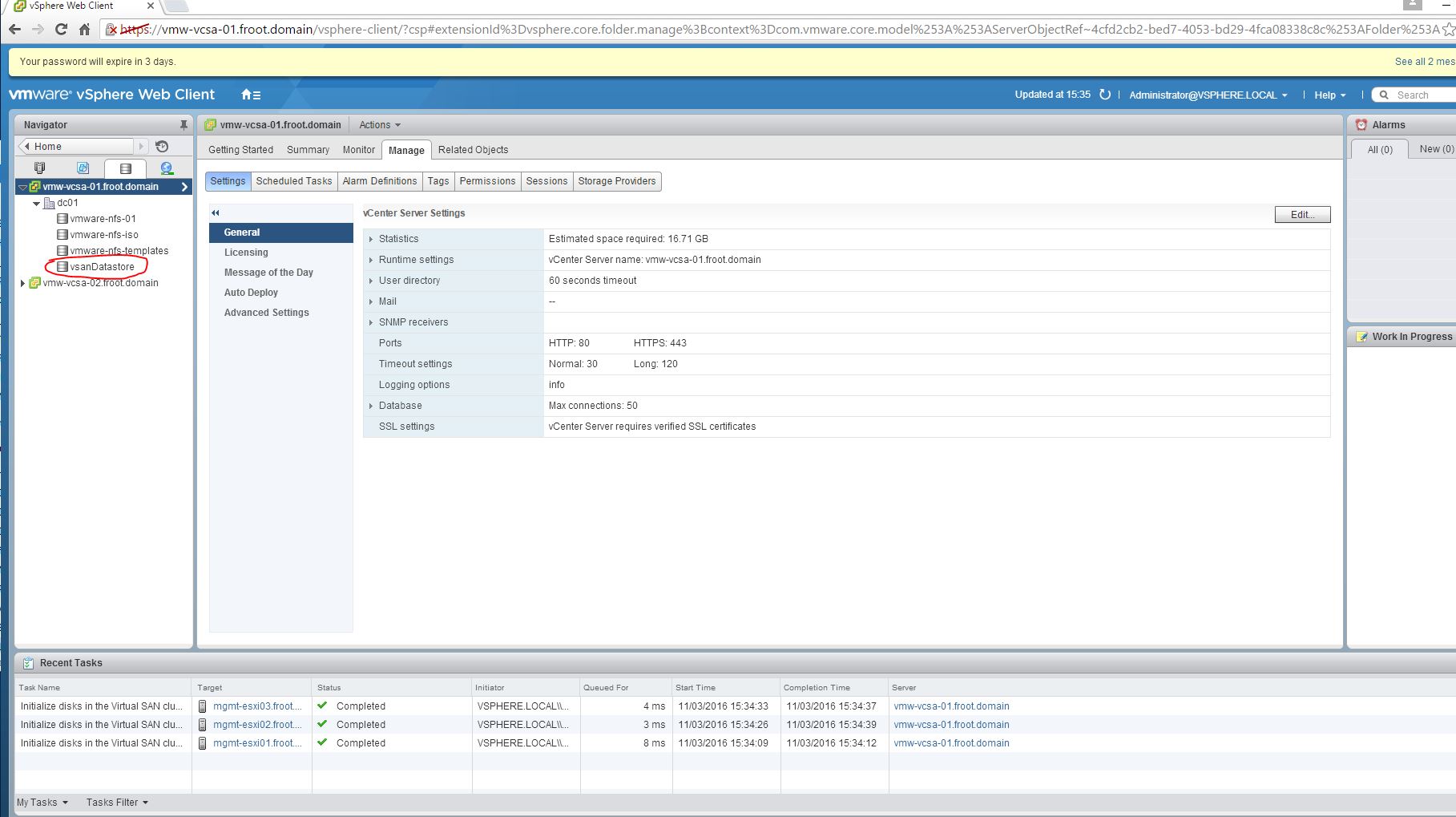
  7. Verify the VSAN datastore now being available and accessible 11 - VSAN datastore active

There you have it. Implementing all flash VSAN requires manually tagging the SSDs as capacity SSDs for the time being and this is how you do it. I may also add that since the all flash VSAN, my storage performance has gone through the roof in my home lab which is great too. However this is all done on Whitebox hardware and not all of them are fully on VMware HCL….etc which makes those performance figures far from optimal. It would be really good to see performance statistics if you have deployed all flash VSAN in your production environment.

Cheers

Chan


New VMware Hybrid Cloud Announcements – Summary

Cover Photo

As you may already know by now, VMware have just announced a number of new product versions along with few changes to their Cloud Management product positioning during the online event that took place on the 10th of Feb 2016 (If you missed the announcements, you can watch the recordings here). The announcements were made for products that fall under 2 tracks (Digital workspace & Cloud Management which effective means EUC &  Datacenter track respectively).

While I’m not going to cover what was discussed under the Digital Enterprise section (mostly EUC focused, around Horizon Suite and Workspace 1), I’m going to summarize some of the key points mentioned under the Hybrid Cloud track below and the related product positioning changes.

Hybrid Cloud related new Product updates – Summary

One Cloud (Hybrid Cloud with private, hosted and public cloud), Any application, Any device seems to be the new mantra going forward and is fully underpinned by VMware’s software Defined Datacentre (SDDC). VMware are seeing the Hybrid Cloud is playing a major part in the interim future in the industry (I know many customers agree too) and they appear to be seeing user owned kit (housed in an on-premise DC or an off premise hosted DC like Equinix) along with various different public cloud platforms all playing a part of a typical customer datacentre going forward. Each public cloud provider is almost seen as a new Silo in the customers new Hybrid Cloud Datacentre and VMware are focusing on providing a unified management platform across all these Silo’s. To be frank, this is not so much news, as their focus and the subsequent messaging has been the same for a while. But their have now added compatibility with almost all key Public cloud platforms (AWS, Azure, Google, IBM SoftLayer) and stressing the “any cloud” message through this announcement.

Here’s the summary of the related new products announced

  • VMware VSAN 6.2 Updates

    • VSAN 6.2 is announced
      • For key 6.2 (new) technical features – Refer to the 2 articles below
        • Duncan Epping’s legendary Yellow-Bricks here
        • Comac Hogan’s blog here
    • VSAN (together with vSphere) is a Hyper-Converged Software Solution (finally…!!)           HCS
    • All flash VSAN is key and most new features are available on all flash VSAN only – also inline with storage industry trends.
    • 2 new VSAN ready node options from Supermicro, Hitachi and Fujitsu (different to legacy VSAN ready nodes) VSAN - Ready Nodes
      • Customers can choose to factory install the VMware hyper-converged software (HCS), namely vSphere and Virtual SAN.
      • Customers can use their existing vSphere and VSAN licenses, or  buy new licenses from the OEM vendor. All OEMs offer the flexibility of perpetual licenses that are node-transferrable, while some OEMs may also offer embedded licenses, which are fundamentally tied to the hardware system
      • Customers can continue to purchase support from VMware, or leverage a single-vendor model by getting support for both hardware and software from their OEM of choice
    • VSAN is also available for VMware Photon – DevOps & CNA friendly                    VSAN for Photon


  • vRealize Suite Updates

    • vRA Version 7.0 (announced in December 2015)
      • More cloud endpoint supported: now supports Google, IBM SoftLayer, as well as AWS, Azure & vCloud Air
    • vRealize Business 7.0 announced
    • vROPS remain the same as version 6.2
    • vRealize Log Insight 3.3
  • NSX Updates
    • NSX is the common networking layer across private and public cloud platforms (including AWS & Azure)


Product Positioning & Packaging Changes – Summary

Number of VMware Product Suite / Packages have been changed to reflect 3 different use cases VMware trying to address with their product portfolio, going forward. These key use cases are as follows,

  1. Intelligent Operations: Basic, virtualised datacentre use case
  2. Automated to IaaS: Have advanced virtualisation with additional requirements such as some automation and orchestration and IaaS capability
  3. DevOps-Ready: True Hybrid Cloud requirement

Use Cases

And the content of these product suites have also changed. A quick summary of the key changes are explained below.

  • Core Platform – “Naked” vSphere                                               vSphere versions

    • Previous: Standard, Enterprise, Enterprise plus (for both the vSphere and vSOM bundles)
    • New: Standard & Enterprise plus only – No more vSphere Enterprise!
      • For existing vSphere ENT customers, there are 2 choices
        • Upgrade to vSphere ENT+ with 50% discount (available till 25th of June 2016) OR
        • Stay on vSphere ENT till product end of support
    • vCenter list price increased, but now include 25 OSI license for vRealize Log Insight (restricted to do log analysis for vSphere hosts, vCenter & VMware content packs only) in return.
  • vSphere with Operations Management (vSOM)

    • Previous: vSOM Standard, Enterprise & Enterprise plus
    • New: Enterprise plus only – No more vSOM STD or vSOM ENT!
      • For existing vSOM STD & ENT customers, there are 2 choices
        • Upgrade to vSphere ENT+ with 50% discount (available till 25th of June 2016) OR
        • Stay on current till product end of support
  • vRealize Suite (vRS) 7.0

     vrealize-suite-lineup

    • Previous: N/A
    • New: STD, ADV, ENT
      • Standard: vRealize Business for Cloud STD, Log Insight, vROPS Advanced
      • Advanced (with IaaS capabilities): vRealize Business for Cloud STD, Log Insight, vROPS Advanced, vRealize Automation Advanced (now cheaper since vRealize Configurations Manager is now excluded)
      • Enterprise (with DevOps capabilities): vRealize Business for Cloud STD, Log Insight, vROPS Advanced, vRealize Automation Enterprise with Application Automation, vROPS App monitoring. (cheaper now as vROPS ENT  & vCM removed from the suite now)
      • vRS licenses are now portable (between private & public cloud) – Applies to the Suite licenses only (standalone components don’t qualify)
        • On-Premise = per CPU socket
        • Public Cloud (vCloud Air,, AWS, Azure) = 15 OSI’s per license unit (portable license unit = 1 cpu socket license)
        • 3rd party On-Prem (Hyper-V, XenServer, KVM) = 15 OSI’s per license unit (portable license unit = 1 cpu socket license)PLU update
  • vCloud Suite (vCS) 7 – New Packaging & Licensing

    • Previous: version 6.0  in STD, ADV, ENT
    • New: version 7.0 also in STD, ADV, ENT. See comparison below.          vCS Comparison
      • All vCS editions now include vRealize Suite & vSphere ENT+
      • SRM & vCM both now removed from vCS 7 ENT
      • New licensing available from 1st of March (Existing vCloud Suite EOA by 1st of June FY16)
      • (Only) vRS Licenses are portable (between private & public cloud)
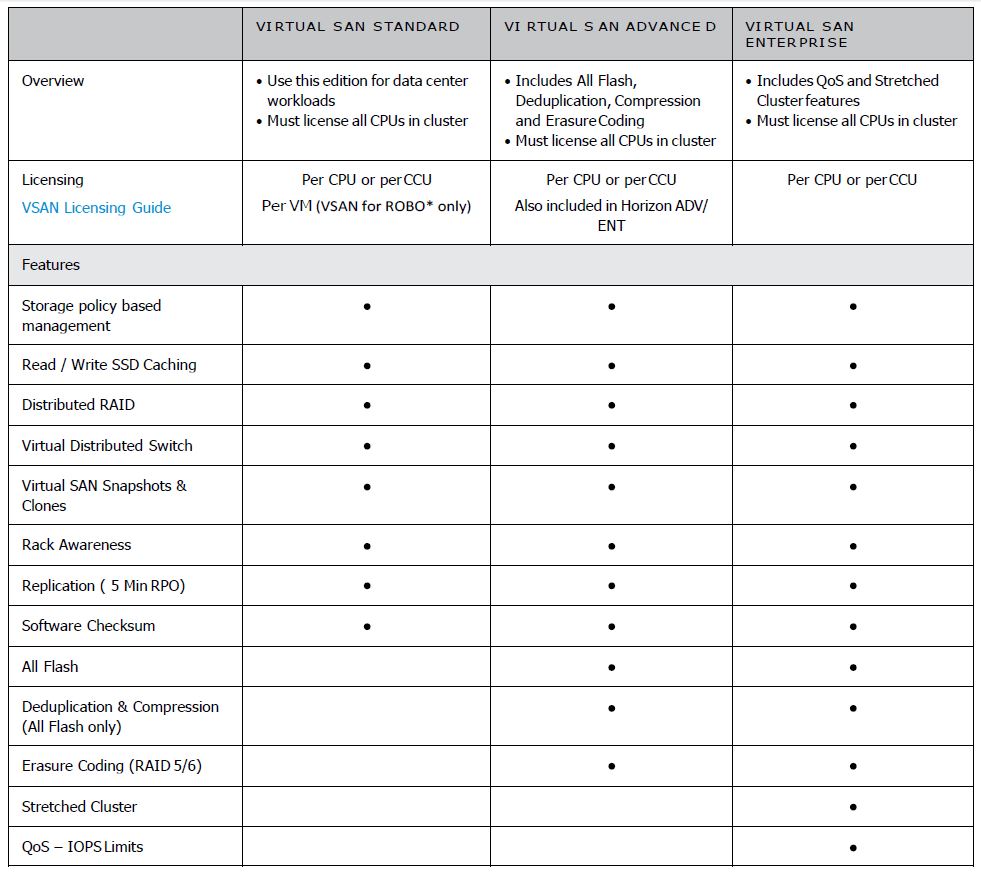
  • VSAN

    • Previous Categories (5.5 & 6.x): Standard & Advanced
    • New categories (from version 6.2 onwards): Standard, Advanced, Enterprise   VSAN 6.2 Editions

Additional info regarding packaging changes and price changes can be found on the following links

Re-Cap and My thoughts

  • There appear to be less and less focus on core products such as vSphere and VMware’s focus is somewhat shifting to other management and enablement areas. This makes sense as the hypervisor is increasingly becoming a commodity and the value-add now is in the Cloud Management Software suite that manage the Hypervisor as well as various other Public Cloud platforms.
  • In general, cost of basic vSphere will go up for many customers due to the removal of Enterprise edition and most medium to large corporate and enterprise customers will now be forced to buy ENT+ edition, which also just happened to cost a little more than it did before, at the same time.
  • New products like VSAN & NSX-v however will increase the sticky-ness of the vSphere customers (both needs vSphere) within the customer’s datacentre still so vSphere is not yet fully done with (for the foreseeable future anyway)
  • While all the new VSAN features are really awesome and great, do bear in mind that most of them if not all are going to cost you slightly more as,
    • They are only available with more expensive Enterprise edition of VSAN
    • They are only available for on all flash VSAN’s. Meaning more expensive SSD drives for capacity too so more expensive hardware.
  • All flash VSAN should still be cheaper overall though for the customer compared to having to buy the same servers (without disks) + a separate all flash SAN
  • So all in all, except for VSAN 6.2 announcement, not a whole lot of exciting new features. This is not a major announcement but more of a minor change of product positioning, along with a re-pricing exercise, however I do like the direction VMware is heading with their product portfolio.


Note: Slide credit goes to VMware. Note that the NDA on some of these contents have now elapsed (after the general announcement on the 10th of Feb) so I shouldn’t get in to trouble for sharing 🙂

Cheers

Chan