New Dedicated VSAN Management Plugin For vROps Released

Some of you may have seen the tweets and the article from legendary Duncan Epping here about the release of the new VMware VSAN plugin for vROPS (vRealize Operations Management Pack for vSAN version 1.0)

If you’ve ever had the previous VSAN plugin for vROps deployed, you might know that it was not a dedicated plugin for VSAN alone, but was a vRealize Operations Management Pack for Storage Devices as a whole which included not just the visibility in to VSAN but also legacy storage stats such as FC, iSCSI and NFS for legacy storage units (that used to connect to Cisco DCNM or Brocade Fabric switches).

This vROps plugin for vSAN  however is the first dedicated plugin for VSAN (hence the version 1.0) on vROps. According to the documentation it has the following features

  • Discovers vSAN disk groups in a vSAN datastore.
  • Identifies the vSAN-enabled cluster compute resource, host system, and datastore objects in a vCenter Server system.
  • Automatically adds related vCenter Server components that are in the monitoring state.

How to Install / Upgrade from the previous MPSD plugin

  1. Download the management pack (.pak file)
    1. https://solutionexchange.vmware.com/store/products/vmware-vrealize-operations-management-pack-for-vsan
  2. Login to the vROps instance as the administrator / with administrative privileges and go to Administration -> Solutions
  3. Click add (plus sign) and select the .Pak file and select the 2 check boxes to replace if already installed and reset default content. Accept any warnings and click upload.
  4. Once the upload is complete and staged, verify the signature validity and click next to proceed               
  5. Click next and accept the EULA and proceed. The management plugin will start to install.
  6. Now select the newly installed management plugin for VSAN and click configure. Within this window, connect to the vCenter server (cannot use previously configured credentials for MPSD). When creating the credentials, you need to specify an admin account for the vCenter instance. Connection can be verified using the test button.  
  7. Once connected, wait for the data collection from VSAN cluster to complete and verify collection is showing
  8. Go to Home and verify that the VSAN dedicated dashboard items are now available on vROps               
  9. By Default there will be 3 VSAN specific dashboard available now as follows under default dashboards
    1. vSAN Environment Overview – This section provide some vital high level information on the vSAN cluster including its type, total capacity, used, any congestion if available, and average latency figures along with any active alerts on the VSAN cluster. As you can see I have a number of alerts due to using non-compliant hardware in my VSAN cluster.   
    2. vSAN Performance
      1. This default dashboard provide various performance related information / stats for the vSAN cluster rand datastores as well as the VM’s residing on it. You can also check performance such as VM latency and IOPS levels based on the VM’s you select on the tile view and the trend forecast which is think is going to be real handy.    
      2. Similarly, you can see performance at vSAN disk group level also which shows information such as Write buffer performance or Reach cache performance levels, current as well as future forecasted levels which are new and were not previously accessible easily.
      3. You can also view the performance at ESXi host level which shows the basic information such as current CPU utilisation as well as RAM including current and future (forecast) trend lines in true vROps style which are going to be really well received. Expect the content available on this ppage to be significantly extended in the future iterations of this mgmt. pack.  
    3. Optimize vSAN Deployments – This page provide a high level comparison of vSAN and non vSAN enviorments which would be especially handy if you have vSAN datastores alongside traditional iSCSI or NFS data stores to see how for example, IOPS and latency compares between VM’s on VSAN and an NFS datastore presented to the same ESXi server (I have both)    
  10. Under Environment -> vSAN and Storage Devices, additional vSAN hierarchy information such as vSAN enabled clusters, Fault domains (if relevant), Disk groups and Witness hosts (if applicable) are now visible for monitoring which is real handy.                                                                        
  11. In the inventory explorer, you can see the list of vSAN inventory items that the data are being collected for.   

All in all, this is a welcome addition and will only continue to be improved and new monitoring features added as we go up the versions. I realy like the dedicated plugin factor as well as the nice default dashboards included with this version which no doubt will help customers truly use vROps as a single pane of glass for all things monitoring on the SDDC including VSAN.

Cheers

Chan

VMware Storage and Availability Technical Documents Hub

homepage

This was something I came across accidentally so thought it may be worth a very brief post about as I found some useful content there.

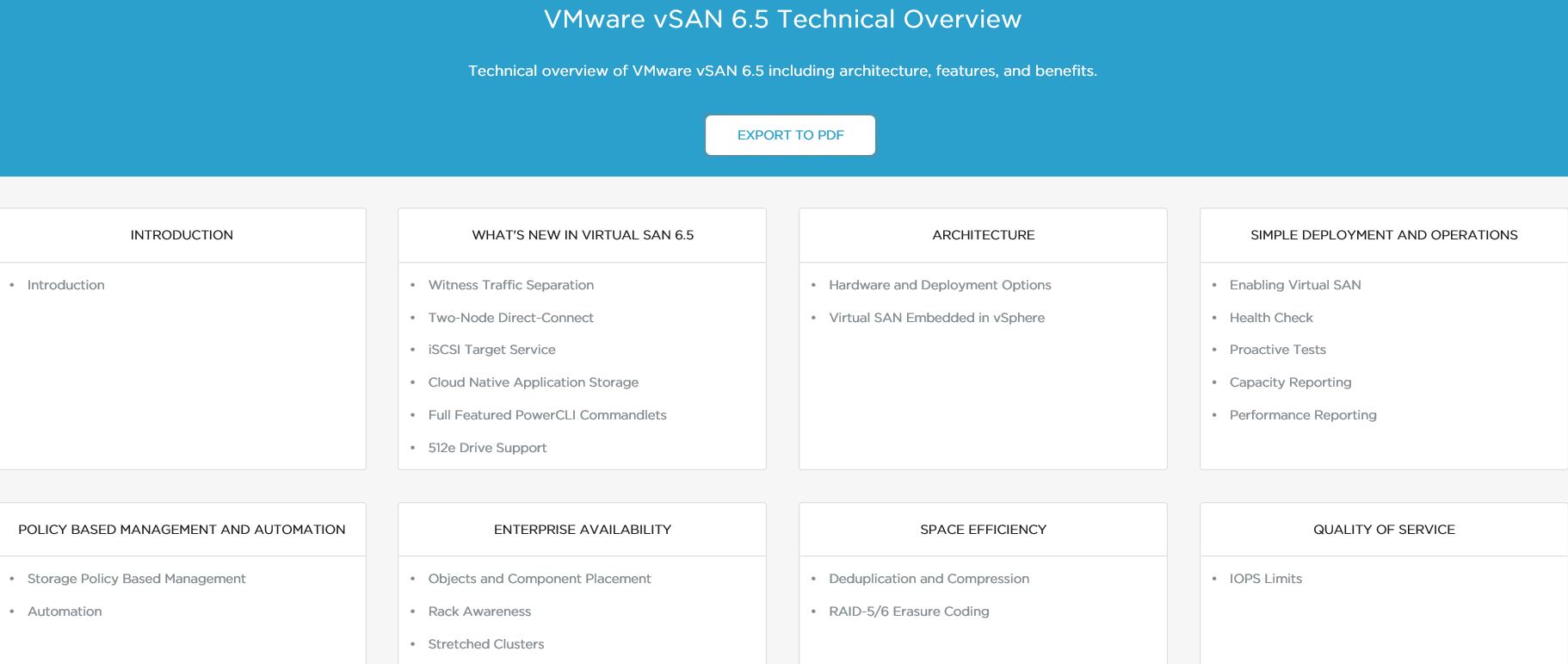
VMware Storage and Availability Technical Documents Hub, is an online repository of technical documents and “how to” guides including video documents for all storage and availability products within VMware. Namely, it has some very useful contents for 4 VMware product categories (as of now)

  • VSAN
  • SRM
  • Virtual Volumes
  • vSphere Replication

For example, under the VSAN section, there are a whole heap of VSAN 6.5 contents such as technical information on what’s new with VSAN 6.5, how to design and deploy VSAN 6.5…etc as well as some handy video’s on how to configure some of those too. There also seem to be some advanced technical documentation around VSAN caching algorithms…etc & some deployment guides which I though was quite handy.

vsan

Similarly there are some good technical documentation around vVols including overview, how to set up and implement VVols…etc.. However in comparison, the content is a little light for the others compared to VSAN, but I’m sure more content will be added as the portal gets developed further.

All the information are presented in HTML5 interface which is easy to navigate with handy option to print to PDF option on all pages if you wanna download the content as a PDF for offline reading which is cool.

I’d recommend you to check this documentation hub, especially if you use any storage solution from VMware like VSAN and would like to see most of the relevant technical documentation all in a single place.

Cheers

Chan

VSAN, NSX on Cisco Nexus, vSphere Containers, NSX Future & a chat with VMware CEO – Highlights Of My Day 2 at VMworld 2016 US

In this post,  I will aim to highlight the various breakout sessions I’ve attended during the day 2 at VMworld 2016 US, key items / notes / points learnt and few other interesting things I was privy to  during the day that is worth mentioning, along with my thoughts on them…!!

Day 2 – Breakout Session 1 – Understanding the availability features of VSAN

vsan-net-deploy-support

  • Session ID: STO8179R
  • Presenters:
    • GS Khalsa – Sr. Technical Marketing manager – VMware (@gurusimran)
    • Jeff Hunter – Staff Technical Marketing Architect – VMware (@Jhuntervmware)

In all honesty, I wasn’t quite sure why I signed up to this breakout session as I know VSAN fairly well, including its various availability features as I’ve been working with testing & analysing its architecture and performance when VSAN was first launched to then designing and deploying VSAN solutions on behalf of my customers for a while. However, having attended the session it reminded me of a key fact that I normally try to never forget which is “you always learn something new” even when you think you know most of it.

Anyways, about the session itself, it was good and was mainly aimed at the beginners to VSAN but I did manage to learn few new things as well as refresh my memory on few other facts, regarding VSAN architecture. The key new ones I learnt are as follows

  • VSAN component statuses (as shown within vSphere Web Client) and their meanings
    • Absent
      • This means VSAN things the said component will probably return. Examples are,
        • Host rebooted
        • Disk pulled
        • NW partition
        • Rebuild starts after 60 mins
      • When an item is detected / marked as absent, VSNA typically wait for 60 minutes before a rebuild is started in order to allow temporary failure to rectify itself
        • This means for example, pulling disks out of VSAN will NOT trigger an instant rebuild / secondary copy…etc. so it wont be an accurate test of VSAN
    • Degraded
      • This typically means the device / component is unlikely to return. Examples include,
        • A permeant Device Loss (PDL) or a failed disk
      • When a degraded item is noted, a rebuild started immediately
    • Active-Stale
      • This means the device is back online from a failure (i.e. was absent) but the data residing on it are NOT up to date.
  • VSAN drive degradation monitoring is proactively logged in the following log files
    • vmkernel.log indicating LSOM errors
  • Dedupe and Compression during drive failures
    • During a drive failure, de-duplication and compression (al flash only) is automatically disabled – I didn’t know this before


Day 2 – Breakout Session 2 – How to deploy VMware NSX with Cisco Nexus / UCS Infrastructure

  • Session ID: NET8364R
  • Presenters:
    • Paul Mancuso – Technical Product Manager (VMware)
    • Ron Fuller – Staff System Engineer (VMware)

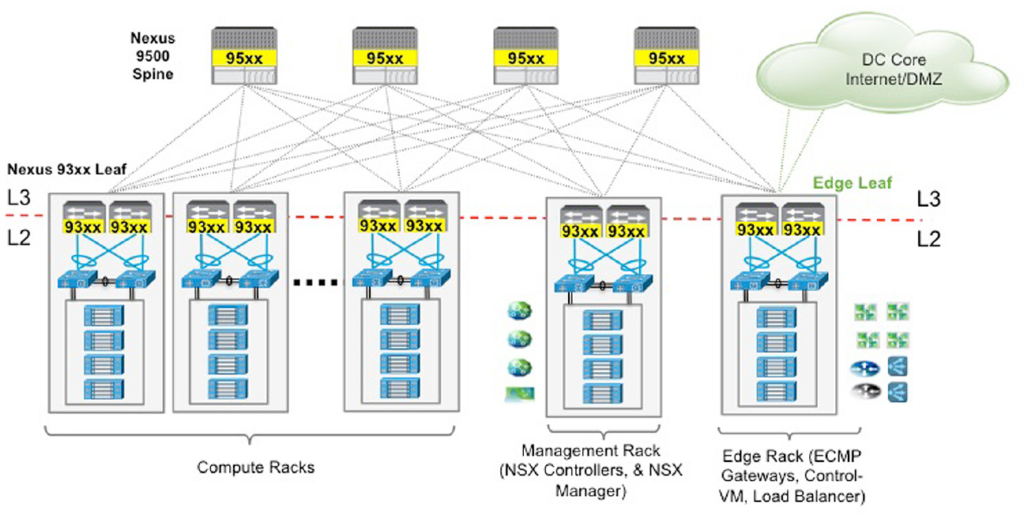
This session was about a deployment architecture for NSX which is becoming increasingly popular, which is about how to design & deploy NSX on top of Cisco Nexus switches with ACI as the underlay network and Cisco UCS hardware. Pretty awesome session and a really popular combination too. (FYI – I’ve been touting that both these solutions are better together since about 2 years back and its really good to see both companies recognising this and now working together on providing guidance stuff like these). Outside of this session I also found out that the Nexus 9k switches will soon have the OVS DB support so that they can be used as TOR switches too with NSX (hardware VTEP to bridge VXLANs to VLANs to communication with physical world), much like the Arista switches with NSX – great great news for the customers indeed.
ACI&NSX-2

I’m not going to summarise the content of this session but wold instead like to point people at the following 2 documentation sets from VMware which covers everything that this session was based on, its content and pretty simply, everything you need to know when designing NSX solutions together with Cisco ACI using Nexus 9K switches and Cisco UCS server hardware (blades & rack mounts)

One important thing to keep in mind for all Cisco folks though: Cisco N1K is NOT supported for NSX. All NSX prepped clusters must use vDS. I’m guessing this is very much expected and probably only a commercial decision rather than a technical one.

Personally I am super excited to see VMware ands Cisco are working together again (at least on the outset) when it comes to networking and both companies finally have realised the use cases of ACI and NSX are somewhat complementary to each other (i.e. ACI cannot do most of the clever features NSX is able to deliver in the virtual world, including public clouds and NSX cannot do any of the clever features ACI can offer to a physical fabric). So watch this space for more key joint announcements from both companies…!!

Day 2 – Breakout Session 3 – Containers for the vSphere admin
Capture

  • Session ID: CNA7522
  • Presenters:
    • Ryan Kelly – Staff System Engineer (VMware)

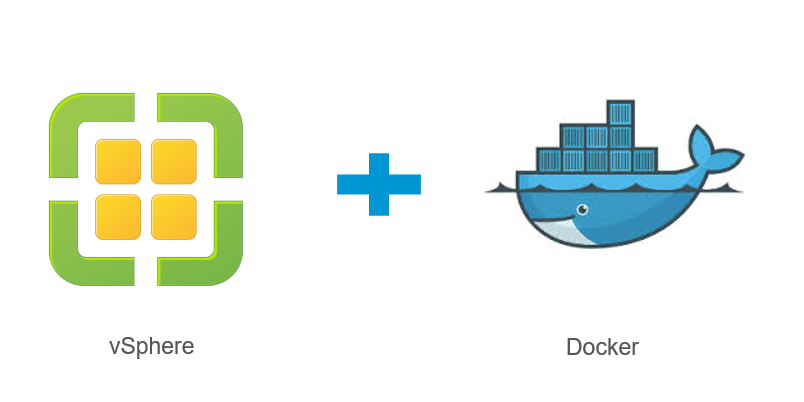
A session about how VMware approaches the massive buzz around containerisation through their own vSphere integrated solution (VIC) as well as a brand new hypervisor system designed from ground up with containerisation in mind (Photon platform). This was more of a refresher session for than anything else and I’m not going to summarise all of it but instead, will point you to the dedicated post I’ve written about VMware’s container approach here.

Day 2 – Breakout Session 4 – The architectural future of Network Virtualisation

the-vision-for-the-future-of-network-virtualization-with-vmware-nsx-27-638

  • Session ID: NET8193R
    Presenters: Bruce Davie – CTO, Networking (VMware)

Probably the most inspiring session of the day 2 as Bruce went through the architectural future of NSX where he described what the NSX team within VMware are focusing on as key improvements & advancements of the NSX platform. The summary of the session is as follows

  • NSX is the bridge from solving today’s requirement to solving tomorrow’s IT requirements
    • Brings remote networking closer easily (i.e. Stretched L2)
    • Programtically (read automatically) provisoned on application demand
    • Security ingrained at a kernel level and every hop outwards from the applications
  • Challenges NSX is trying address (future)
    • Developers – Need to rapidly provision and destroy complex networks as a pre-reqs for applications demanded by developers
    • Micro services – Container networking ands security
    • Containers
    • Unseen future requirements
  • Current NSX Architecture
    • Cloud consumption plane
    • Management plane
    • Control plane
    • Data plane
  • Future Architecture – This is what the NSX team is currently looking at for NSX’s future.
    • Management plane scale out
      • Management plane now needs to be highly available in order to constantly keep taking large number of API calls for action from cloud consumption systems such as OpenStack, vRA..etc – Developer and agile development driven workflows….etc.
      • Using & scaling persistent memory for the NSX management layer is also being considered – This is to keep API requests in persistent memory in a scalable way providing write and read scalability & Durability
      • Being able to take consistent NSX snapshots – Point in time backups
      • Distributed log capability is going to be key in providing this management plane scale out whereby distributed logs that store all the API requests coming from Cloud Consumption Systems will be synchronously stored across multiple nodes providing up to date visibility of the complete state across to all nodes, while also increasing performance due to management node scale out
    • Control plane evolution
      • Heterogeneity
        • Currently vSphere & KVM
        • Hyper-V support coming
        • Control plane will be split in to 2 layers
          • Central control plane
          • Local control plane
            • Data plane (Hyper-V, vSphere, KVM) specific intelligence
    • High performance data plane
      • Use the Intel DPDK – A technology that optimize packet processing in Intel CPU
        • Packet switching using x86 chips will be the main focus going forward and new technologies such as DPDK will only make this better and better
        • DPDK capacities are best placed to optimise iterative processing rather than too many context switching
        • NSX has these optimisation code built in to its components
          • Use DPDK CPUs in the NSX Edge rack ESXi servers is  a potentially good design decision?
  • Possible additional NSX use cases being considered
    • NSX for public clouds
      • NSX OVS and an agent is deployed to in guest – a technical preview of this solution was demoed by Pat Gelsinger during the opening key note on day 1 of VMworld.
    • NSX for containers
      • 2 vSwitches
        • 1 in guest
        • 1 in Hypervisor


My thoughts

I like what I heard from the Bruce about the key development focus areas for NSX and looks like all of us, partners & customers of VMware NSX alike, are in for some really cool, business enabling treats from NSX going forward, which kind of reminds me of when vSphere first came out about 20 years ago :-). I am extremely excited about the opportunities NSX present to remove what is often the biggest bottleneck enterprise or corporate IT teams have to overcome to simply get things done quickly and that is the legacy network they have. Networks in most organisations  are still very much managed by an old school minded, networking team that do not necessarily understand the convergence of networking with other silos in the data center such as storage and compute, and most importantly when it comes to convergence with modern day applications. It is a fact that software defined networking will bring the efficiency to the networking the way vSphere brought efficiency to compute (want examples how this SDN efficiency is playing today? Look at AWS and Azure as the 2 biggest use cases) where the ability to spin up infrastructure, along with a “virtual” networking layer significantly increases the convenience for the businesses to consume IT (no waiting around for weeks for your networking team to set up new switches with some new VLANs…etc.) as well as significantly decreasing the go to market time for those businesses when it comes to launching new products / money making opportunities. All in all, NSX will act as a key enabler for any business, regardless of the size to have an agile approach to IT and even embrace cloud platforms.

From my perspective, NSX will provide the same, public cloud inspired advantages to customers own data center and not only that but it will go a step further by effectively converting your WAN to an extended LAN by bridging your LAN with a remote network / data center / Public cloud platform to create something like a LAN/WAN (Read LAN over WAN – Trade mark belongs to me :-))which can automatically get deployed, secured (encryption) while also being very application centric (read “App developers can request networking configuration through an API as a part of the app provisioning stage which can automatically apply all the networking settings including creating various networking segments, routing in between & the firewall requirements…etc. Such networking can be provisioned all the way from a container instance where part of the app is running (i.e. DB server instance as a container service) to a public cloud platform which host the other parts (i.e. Web servers).

I’ve always believed that the NSX solution offering is going to be hugely powerful given its various applications and use cases and natural evolution of the NSX platform through the focus areas like those mentioned above will only make it an absolute must have for all customers, in my humble view.


Day 2 – Meeting with Pat Gelsinger and Q&A’s during the exclusive vExpert gathering

vExpert IMG_5750

As interesting as the breakout sessions during the day have been, this was by far the most significant couple of hours for me on the day. As a #vExpert, I was invited to an off site, vExpert only gathering held at Vegas Mob Museum which happened to include VMware CEO, Pat Gelsinger as the guest of honour. Big thanks to the VMware community team lead by Corey Romero (@vCommunityGuy) for organising this event.

This was an intimate gathering for about 80-100 VMware vExperts who were present at VMworld to meet up at an off site venue and discuss things and also to give everyone a chance to meet with VMware CEO and ask him direct questions, which is something you wouldn’t normally get as an ordinary person so it was pretty good. Pat was pretty awesome as he gave a quick speech about the importance of vExpert community to VMware followed up by a Q&A session where we all had a chance to ask him questions on various fronts. I myself started the Q&A session by asking him the obvious question, “What would be the real impact on VMware once the Dell-EMC merger completes” and Pats answer was pretty straight forward. As Michael Dell (who happened to come on stage during the opening day key note speech said it himself), Dell is pretty impressed with the large ecosystem of VMware partners (most of whom are Dell competitors) and will keep that ecosystem intact going forward and Pat echoed the same  message, while also hinting that Dell hardware will play a key role in all VMware product integrations, including using Dell HW by default in most pre-validated and hyper-converged solution offerings going forward, such as using Dell rack mount servers in VCE solutions….etc. (in Pat’s view, Cisco will still play a big role in blade based VCE solution offerings and they are unlikely to walk away from it all just because of Dell integration given the substantial size of revenue that business brings to Cisco).

If I read in between the lines correctly (may be incorrect interpretations from my end here),  he also alluded that the real catch of the EMC acquisition as far as Dell was concerned was VMware. Pat explained that most of the financing charges behind the capital raised by Dell will need to be paid through EMC business’s annual run rate revenue (which by the way is roughly the same as the financing interest) so in a way, Dell received VMware for free and given their large ecosystem of partners all contributing towards VMware’s revenue, it is very likely Dell will continue to let VMware run as an independent entity.

There were other interesting questions from the audience and some of the key points made by Pat in answering those questions were,

  • VMware are fully committed to increasing NSX adoption by customers and sees NSX as a key revenue generator due to what it brings to the table – I agree 100%
  • VMware are working on the ability to provide networking customers through NSX, a capability similar to VMotion for compute as one of their (NSX business units) key goals. Pat mentioned that engineering in fact have this figured out already and testing internally but not quite production ready.
  • In relation to VMware’s Cross Cloud Services as a service offering (announced by Pat during the event opening keynote speech), VMware are also working on offering NSX as a service – Though the detail were not discussed, I’m guessing this would be through the IBM and vCAN partners
  • Hinted that a major announcement on the VMware Photon platform  (One of the VMware vSphere container solutions) will be taking place during VMworld Barcelona – I’ve heard the same from the BU’s engineers too and look forward to Barcelona announcements
  • VMware’s own cloud platform, vCloud air WILL continue to stay focused on targeted use cases while the future scale of VMware’s cloud business will be expected to come from the vCAN partners (hosting providers that use VMware technologies and as a result are part of the VMware vCloud Air Network…i.e IBM)
  • Pat also mentioned about the focus VMware will have on IOT and to this effect, he mentioned about the custom IOT solution VMware have already built or working on (I cannot quite remember which was it) for monitoring health devices through the Android platform – I’m guessing this is through their project ICE and LIOTA (Little IOT Agent) platform which already had similar device monitoring solutions being demoed in the solutions exchange during VMworld 2016. I mentioned about that during my previous post here

It was really good to have had the chance to listen to Pat up close and be able to ask direct questions and get frank answers which was a fine way to end a productive and an education day for me at VMworld 2016 US

Image credit goes to VMware..!!

Cheers

Chan


VMworld 2016 US – Key Announcements From Day 2

A quick summary of this morning’s key note speech at VMworld 2’016 US and few annoucements.

Opening Keynote Speech

The morning keynote speech was hosted by Sunjay Poonan (@Spoonan), who heads up the EUC BU within VMware. Sunjay’s speech was pretty much in line with the general VMware focus areas, mentioned yesterdays key note by Pat Gelsinger which is a complete solution that enable customers of todays enterprises & corporates the ability to use any device, any app & any cloud platform as they see fit without having to worry about workload mobility, cross platform management and monitoring.

While yesterdays session was more focused on the server side of things, Sunjay’s message today was focused on the End User Computing side of things, predictably to a bigger degree. The initial messaging was around the VMware Workspace One suite.

Workspace One suite with VMware identity manager appears to be focusing more and more on the following 3 key areas which are key to todays enterprise IT.

  • Apps and identity
  • Desktop & Mobile
  • Management & Security

Workspace one integration with mobile devices to push out corporate apps on mobile devices similar to Apple app store like interface was demoed which emphasize the slick capabilities of the solution which really appears to be ready for primetime now. He also demoed the conditional access capabilities wihtin the Horizon Workspace suite that prevents data sharing between managed and unmanaged apps. The conditional access can also be extended out to NSX to utilise micro segmentation hand in hand to provide even tighter security which is quite handy.

Stephanie Buscemi – EVP of Salesforce came on stage to talk about how they use VMware Wotrkspace suite to empower their sales people to work on the go which was pretty cool I thought, though there was a little marketing undertone to the whole pitch.

  • My take: Personally I dont cover EUC offerings that much myself though I have a good awareness of their Digital Workspace strategy and have also had hands on design and experience with the Horizon View from back in the days. However I can see the EUC offering from VMware getting better and better every day over the last 5 odd years and dare I say, right now, its one of the best solutions out there for most customers if not the best, given its feature set and the integration to other VMware and non VMware compoenents in the back end data center and Cloud. If you are looking at any EUC solutions, this should be on top of your list to investigate / evaluate.

Endpoint Security

VMware TrustPoint powered by Tanium was showcased and its integration with AirWatch to provide a mobile device management solution togewther with a comprehensive security solution that can track devices and their activities real time (no database-full of old device activity info) and apply security controls real time too. This looked a very attractive proposition given the security concerns of the todays enterprise and I can see where this would add value, provided that the costs stack up.

Free VMware Fusion and Workstation license annouicement

VMware also annouced today thye availability of VMware Fusion and Workstation free liceses to all VMworld attendees through the VMworld 2016 app (already claimed mine) – pretty cool huh?

Cloud Native Applications

Kit Colbert, Cloud Native CTO at VMware spoke about the challenges of using the containerised apps in the enterprise environments which currently lacks a comprehensive management solution. Having been looking at containerisation myself and its practical use for majority of ordinary customers, I can relate to that too myself, especially when you compare managing applications based on containers like Docker to legacy appications that run on a dedicated OSE (Windows, Linux…etc) which can be managed, tracked and monitored with session & data persistence that is lacking in a container instance to a level withouth 3rd party components.

Today, couple of new additional features have been annouced on VIC as folows (If you are new to VIC, refer to my intro blog post here)

  • New: Container registry
  • New: Container management portal

1

vSphere Integrated Containers beta programme is also now available if you want to have a look at http://learn.vmware.com/vicbeta


VMware Integrated OpenStack (VIO)

Also, VIO 3.0 was oifficially annouced today by Kit. I was privy to this information beforehand due to a vExpert only briefing for the same but was not able to disclose anything due to embargo until now.

VIO is a VMware customised distro of OpenStack and the below slide should give you an intro for those of you who aren’t familer with VIO all that well.

VIO1

Running native OpenStack is a bit of a nightmare as it requires lots of skills and resources which restricts its proper production use to large scale organisations with plenty of technical expertise and resources. Based on my experience, lots of customers that I know who’ve initially started out with ambitious (vanila) OpenStack projects have decided to abandon half way through due to complexity…etc. to switch back to vSphere. VIO attempts to solve this somewhat to help customers run OpenStack with a VMware flavour to make things easier for mass customer adoptoin.

The annoucements for VIO was the release of the VIO 3.0 which has the following key features / improvements

  • Mitaka Based
    • VIO 3.0 distribution is now based on the latest OpenStack release (Mitaka)
    • Leverage the latest features and enhancement of the Mitaka Release
      • Improved day-to-day experience for cloud admins and administrators.
      • Simplified configuration for Nova compute service.
      • Streamlined Keystone identity service is now a one-step process for setting up the identity management features of a cloud network.
      • Keystone now supports multi-backend allowing local authentication and AD accounts simultaneously.
      • Heat’s convergence engine optimized to handle larger loads and more complex actions for horizontal scaling for improved performance for stateless mode.
      • Enhanced OpenStack Client provides a consistent set of calls for creating resources no longer requiring the need to learn the intricacies of each service API.
      • Support for software development kits (SDKs) in various languages.
        –New “give me a network,” feature capable of creating a network, attaching a server to it, assigning an IP to that server, and making the network accessible, in a single action
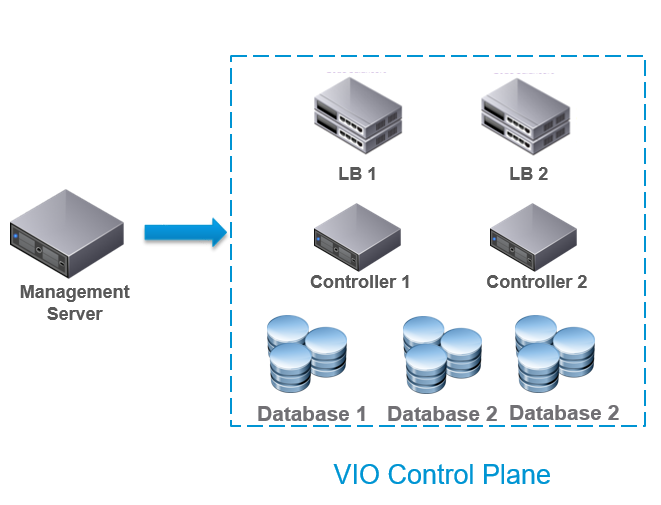
  • Compact VIO control pane
    • VIO management control plane has been optimized and architected to run in a compact architecture   VIO
      • Reduces infrastructure and costs required to run an OpenStack Cloud
      • Ideal for multiple small deployments
      • Attractive in relaxed SLA scenarios
      • Database backed up in real time: No data loss
    • Slimmer HA architecture
      • VIO0
      • educed footprint on management cluster
      • Full HA: No service downtime
      • Database replication: No data loss
      • 6000+ VMs
      • 200+ Hypervisors
  • Import existing vSphere workloads
    • Existing vSphere VMs can be imported and managed via VIO OpenStack APIs
      • Quickly import vSphere VMs into VIO
      • Start managing vSphere VMs through standard OpenStack APIs
    • Quickly start consuming existing VMs through OpenStack


Nike CTO who’s a VIo customer came on stage to discuss how Nike deployed a large greenfield OpenStack deployment using VMware Integrated OpenStack (VIO) and an EUC solution at all Nike outlets / shops using Airwatch which was a good testement for customer confidence though it did have a little markletting undertone to it all.


NSX

the head of the NSX business unit within VMware highlighted the key advancements NSX have made and the 400% YoY growth of adoption from fee paying customers deploying NSX to benefit from Micro segmentation (through the distributed firewall capability) and automation and orchestration. NSX roadmap extends far beyond what you can imagine as its current usecases and its sufficient to say that NSX will play a being part as an enabler for customers to freely move their workloads from onbe place (i.e. On premise) to a Public cloud (i.e. AWS) through the dynamic extension of L2 adjacency and other LAN services, transforming the WAN in to an extended LAN.

To this effect, VMware also announced the availability of a free NSX Pre-Assessment which is now intended to enable customers to employ the Assess -> Plan -> Enforce -> Monitor approcah to NSX adoption.


VSAN

Yanbing Li, whos the VSAN business unit head came on stage and discussed the hugh demand from customers in VSAN which currently stands over 5000 fee paying customers using VSAN in production as the preferred storage for vSphere. The following roadmap items were also mentioned for VSAN

  • VSAN is the default supported storage platform for VIO and Photon.
  • Intelligent performance analytics & policies in VSAN for proactive management
  • Fully integreated software defined encryption for VSAN

There are couple of other new features coming out soon which I am fully aware of but were not annouced during VMworld 2016 US so im guressing they’ll be annouced during the Barcelona event? (I cannot disclose until then of course :-))

All in all, not a large number of new product or feature accouncements on day 2. But the key message is NSX & VSAN are key focius areads (we already knew this) and VIC & VIO will continue to be improved which is good to see.


Slide credit goes to VMware


Cheers

Chan


vSphere Integrated Containers – My thoughts

Capture

During the VMworld 2016, one thing that struck me was the continued focus VMware appears to have on containerisation. I have been looking at containerisation over the last year and half with interest to understand the conept, current capabilities of the available platforms and the practical use for the typical customer. I was also naturally keen on what companies such as VMware and Microsoft have to offer on the same front. VMware annouced number of initiatives such as vSphere Integrated Containers & the Photon platform during VMworld 2015 as their answers to the containerisation and having been looking at their solutions, and also having seen & listened to various speakers / engineers / evagelists during the VMworld 2016 US event, it kind of emphesized the need for me to venture further in to containerisation and especially, VMware’s solutions to containerisation. So Im gonna begin with a quick intro blog post about one of VMware’s approach to containers and what my thoughts are on the solution. I will aim to provide future posts to dig deeper in to th architecture and the deployment apsect of it…etc.

On the front of containers, VMware’s strategy is focused on 2 key solution offerings, vSphere Integrated Containers and Photon platform. While the Photon solution is not yet quite ready for production deployment in my view, its aimed at all greenfield customers who currently do not have legacy vSphere deployments and are strating out afresh. VIC on the other hand is available today & specially aimed at existring vSphere customers hence the main focus of this post.

vSphere Integrated Containers (VIC)

This is the containerisation solution for existing VMware vSphere customers and has been designed for extending vSphere capabilities to the containerised world (or vise versa, depending on how you look at it). It is predominantly aimed at existing vSphere customers who are wanting to jump on to or explore containerised app development for production use.

For those of you who are new to VIC, here’s a quick intro.

In addiiton to typical vSphere components, VIC solution itself consist of 3 main components

  1. VIC Engine – A container run time for vSphere which is deployed on to ESXi. This is an OpenSource development and is available on GitHub. This allows developpers familer wiyth Docker container developments to deploy them alongside existing VMs on an ESXi / vSphere platform and is directly manageable from using the vSphere UI (Web Client). VIC engine is referred to as VCH (Virtual Container Host) and is backed by a vSphere resource pool typically within a cluster. It also containes a copy of the conatainer images which are mapped as vmdk’s on tradiitonal vSphere components such as a VSAN datastore.                    vch-endpoint
  2. Harbour – An enterprise class registry service that stores & distributes Docker images that also include additional security, identity and management for the enterprise. Can be used as a lovcal, on-premise Docker repository so that enterprises using Docker containers won’t have to worry about the security concerns of using the public Docker repository over internet
  3. Admiral – Scalable, lightweight container management playtform used to deploy and manage container based applications

Together with vSphere, VIC provide the customers the ability to deliver a containr based solution in a production environment without having to build a dedicated environment exclusively for the containers.

The main difference between a native container approach such as native Docker on Linux Vs VIC is that,

  • Docker on Linux:  Docker outilises native Linux concept called namespaces. While more inforamtion can be found here, Docker on Linux relies on spewing multiple namespaces / containers within the same Linux server instance so spinning up an applicatiojn service 9that runs inside a container) is super fast (say, compared to powering on a VM with a full blown OS which takes time to load up and then launch the application). Same applies when you stop an application service (just stops the underlying container on th eLinux kerner). Both these operations are executed in memory. Containers
  • VMware Integrated Containers:  The container instance runs in a dedicated, micro OSE (Operating System Environment) called JeVM (Just Enough VM) which consist of a minimalistick version of Linux kernel that is just sufficient to run a container instance.. This kernal is derived from VMware’s project Photon. Photon platform itself is seperate to VIC solution and is supposed to be the second approach VMware are taking for conatiners and Cloud Native Applications, especifically aimed at greenfield deployments where you do not have an existing vSphere stack. in the case of VIC, it is important to remember that the Photon project code used within this micro VM consist of the minimal requirements to run a Docker container instance (Linux kernel and few addiitonal supporting resources giving it a minimum footprint). This Je VM instance is also using the instance clone feature available on vSphere 6.0 to quickly spin up Je VM’s for container instantiation (upon “docker run” for exmaple) so they strats up and closes down at near native speeds to that of a native container on Linux. In return for this fat client approach, customer gets a similar experience when it comes to managing these conatiner environments to that of thatier legacy infrastructure as the existing VMware tools such as vROPS, NSX…etc are all compatible with them (no such compatibility when runniong native Linux containers with Docker)

VIC3

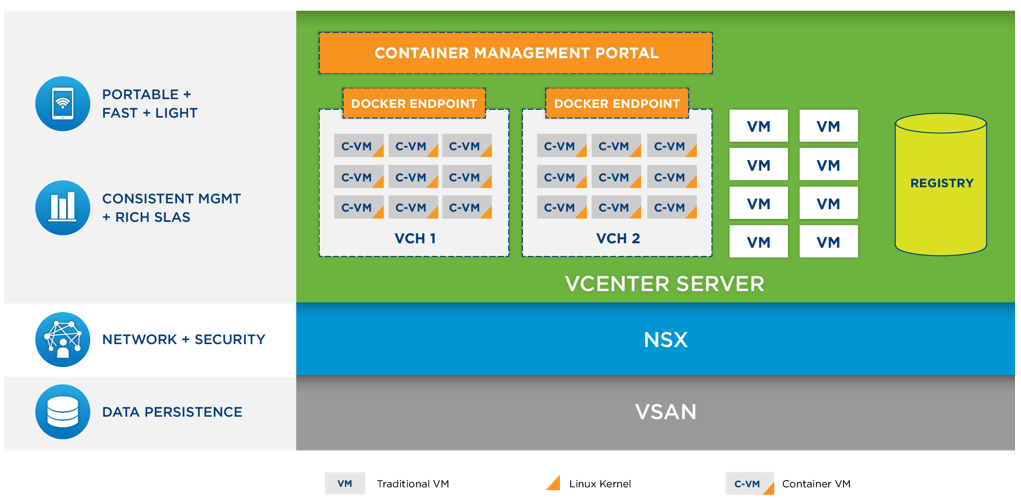
The typical VIC architecture looks like below

VIC2

At the foundation of VIC is vSphere, the same infrastructure that customers have standardized on for all applications from test/dev to business critical apps. VIC adds a graphical plug in to the Web Client for management and monitoring. The Virtual Container Host provides a Docker API endpoint backed by a vSphere resource pool – beyond one VM or dedicated physical host. Instant Clone Template is running Photon OS Linux kernel. Developers interact from standard Docker command line interfaces or API clients. Docker commands are mapped to corresponding vSphere actions by the VCH. A request to run a new image invokes Instant Clone to rapidly fork new “just enough” VMs (Je VM) for execution of the container. Traditional apps can also run alongside containers on the VCH.

As for my thoughts, if you are an existing VMware customer, VIC gives you get the best of both worlds where you can benefit from the existing infrastructure while also benefiting from the agility available through the use of Docker container instances. For example, during the VMworld 2016 US event, VMware’s head of Cloud Native Applications BU, Kit Colbert demoed the integration of vSphere Integrated Containers with vROPS where even containerised apps can have the typical health and performance details shown via vROPS dashboards, much like legacy apps and such capabilities that are not natively available with vanila Docker instances. He also demoed the vRA integration which enables developers to self service containerised application storage placement through a policy change which automatically move the container VM / image content over from one VSAN storage tier to another. I believe such inter-operability and integration with th elegacy toolkit is very important for mass adoption of containerised apps going forward, especially for existing customers with legacy tools and apps. Furthermore, VIC solution also integrate with NSX for extending networking security components in to the container VMs / instance too which is totally cool.

Most importantly, VIC is available free as an opensource download for all VMware customers which makes the case for it even more appealing.

Cheers

Chan

P.S. Slide credit goes to VMware

#Cloud Native #VIC #Photon #VMware #VMworld

VMworld 2016 US – Key Announcements From Day 1

Pat gelsinger

So the much awaited VMworld 2016 US event kicked off today amongst much fanfare and I was lucky to be one of them there at the event. Given below are the key highlights from the day 1 general session & the key annoucements made by VMware CEO Pat Gelsinger. I’ve highlighted the key items.

Theme of this years VMworld is Be Tomorrow. This is quite fitting as technology today defines the tomorrow for the world and we as the IT community plays a key part in this along with vendors like VMware who defines / invent most of those technologies.

Pat mentioned that for VMware and their future direction, the Cloud is key. Both Public and Private cloud are going to define many IT requirements of tomorrow which I fully agree with and VMware’s aim appears to be to move away from the traditional vSphere based compute virtualisation to become a facilitator of cross cloud workload mobility and management.

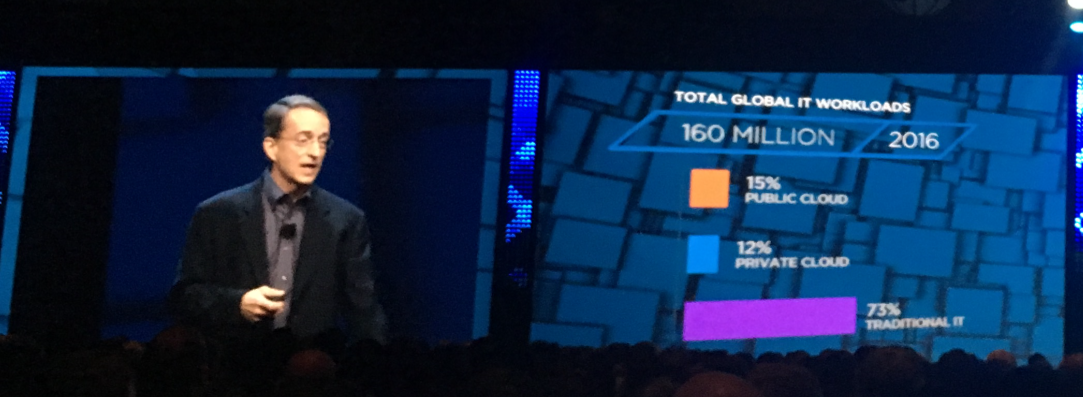
He also discussed the status of where the current public and private cloud adoption is at, which is presently heavily biased towards the public cloud rather than private cloud adoption, which inharently is quite difficult to retro fit to a legacy enviornment based on my experience too. Based on VMware research and market analytics, thre current IT platform adoption is split as below

  • Public Cloud = 15%
  • Private Cloud = 12%
  • Traditional IT = 73%

Current Cloud Split

According to Pat it will not be around 2021 that the public Vs private cloud usage adoption achieve similar levels and by 2030, they expect the adoptoin rates to be (approximately) as follows

  • Public Cloud =52%
  • Private Cloud = 29%
  • Traditional IT = 19%

From then, the tone shifted to look at VMware’s role in this evolving market. It is pretty obvioius that VMware as a vendor, been diversifying their product positioning to rely less on the core vSphere stack but to focus more on the Cloud management and other software defined offerings for the last few years. This was made possible through the use of vSphere + NSX + VSAN for the SDDC for those who wanted a traditional IT environment or a private cloud platform with vRealize Suite sat on top to provide a common management and monitoring platform (Cloud Management Portal). These have been quite popular and some key highlights mentioned were,

  • vSphere the market leader in Virtualisation – Software Defined Compute
  • VSAN now has over 5000 fee paying customers & growing – Software Defined Storage
  • NSX has 400% YoY growth in adoption – Software Defined Networking
  • vRealize Suite is the most popular Cloud management portal in the industry

Todays main annoucement brings these solutions together in to VMware Cloud Foundation with Cross Cloud Services support. Cross Cloud Architecture annouced as a technical preview today effectively focuses on centralizing the followings across various deifferent private and public cloud platforms

  • Management,
  • Operations
  • Security
  • Networking (the most important one for me)

This tech preview platform initially will support Publci clouds (Azure, AWS, Google Cloud, vCloud Air) as well as vCloud Air Network Partners and private cloud instances

Chris-Wolf-Day-1-Recap-image

The below graphic annouces the Corss cloud services model and the solution proposition quite well. One of the key interesting part of this annoucement is that throuh the IBM partnership, these cross cloud services will be made available as SaS offering (Software as a Service) which require no local installation or PS heavy deployment of management and monitoring components on premise. It would be interesting to see the details of what this means,  and cannot wait to get my hands on the tools once available to look deeper in to details and what that means for the average customers.

2016-08-29_13-15-50

Based on Pat’s description, Cross Cloud Services solution is designed to facilitate moving of applications between private and various public clouds with minimal disruption / effort for the customers.

They also showed a demo of this being in action which was really really impressive. It is pretty obvious that for true cross cloud connectivity and flexbility when it comes to moving applications..etc, one of the key blockers has been the networking restrictions such as the lack of easily available L2 adjacency….etc. VMware are in a prime position to address this through the SDN platform they have in NSX and the demo showed clearly the NSX integration with AWS that automatically deployed an L2 Edge gateway (software) devices in front of AWS Virtual datacenter to offer L2 connectivity back to customers on premise to extend the LAN capability as a key facilitator to enable being able to move a workload from AWS to On-Premise and back. (Think WAN is transformed in to an extended LAN with NSX). I’ve always seen this coming and also discussed with my customers various other posibilities like this that NSX brings on to the table and its nice to see that these capabilities are now being integrated in to othermanagement and monitoring platforms to proviude a true single pane of glass solution for multi cloud management.

The solution demo also included the Arkin integration of the same platfrom (VMware aquired Arkin recently) and it brings the security monitoring and anlytics capability to the platform which is totally awesome..!! I’ve already seen the extensively capability of visualizing networking flow and security contexts of vRealize Network Insight (rebranded Arkin solution) previously but its really good to see that bieng integrated to this Software as a Sevrice Offering. This solution also include traffic encryption capability, even within a public cloud platform like Amazon that you do not get by default which would go a long way towards deploying workloads siubject to regulatory compliance on public cloud platforms.

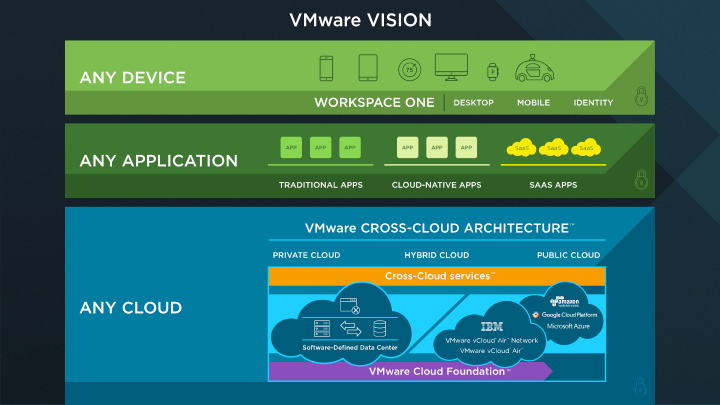
These new annoucements form the basis of the VMwares vision of Any device (through the use of Airwatch), Any application (through the use of Workspace one) and any cloud (now available through the Cross Cloud arhitecture) message that enable their customers to simply their modern day IT operations increse agility, efficiency and productivity.

Cross Cloud

Slide credit goes to VMware

You can find more details in the following links

Cheers

Chan

#NSX #vSphere #VSAN #CrossCloudServices #VmwareCloudFoundation

VMware VSAN 6.2 Performance & Storage savings

Just a quick post to share some very interesting performance stats observed on my home lab VSAN cluster (Build details here). The VSAN datastore is in addition to a few NFS datastores also mounted on the same hosts using an external Synology SAN.

I had to build a number of Test VMs, a combination of Microsoft Windows 2012 R2 Datacenter and 2016 TP4 Datacenter VMs on this cluster and I placed all of them on the VSAN datastore to test the performance. See below the storage performance stats during the provisioning (cloning from template) time. Within the Red square are the SSD drive performance stats (where the new VM’s being created) Vs Synology’s NFS mount’s performance  stats (where templates resides) in the Yellow box.

Provisioning Performance

Pretty impressive from all Flash VSAN running on a bunch of white box servers with consumer grade SSD drives (officially unsupported of course but works!), especially relative to the performance of the Synology NFS mounts (RAID1/0 setup for high performance), right??

Imagine what the performance would have been if this was on enterprise grade hardware in your datacentre?

Also caught my eye was the actual inline deduplication and compression savings immediately available on the VSAN datastore after the VM’s were provisioned.

Dedupe & Compression Savings

As you can see, to store 437GB of raw data, with a FTT=1 (where VSAN keeping redundant copies of each vmdk file), its only consuming 156GB of actual storage on the VSAN cluster, saving me 281GB of precious SSD storage capacity. Note that this is WITHOUT Erasure Coding RAID 5 or RAID 6 that’s also available with VSAN 6.2 which, had that been enabled, would have further reduced the actual consumed space more.

The point of this all is the performance and the storage savings available in VSAN, especially all flash VSAN is epic and I’ve seen this in my own environment. In an enterprise datacenter, All Flash VSAN can drastically improve your storage performance but at the same time, significantly cut down on your infrastructure costs for all of your vSphere storage environments. I personally know a number of clients who have achieved such savings in their production environments and each and every day, there seem to be more and more demand from customers for VSAN as their preferred storage / Hyper-Converged technology of choice for all their vSphere use cases.

I would strongly encourage you to have a look at this wonderful technology and realise these technical and business benefits (summary available here) for yourself.

Share your thoughts via comments below or feel free to reach out to discuss what you think via email or social media

Thanks

Chan

VMware All Flash VSAN Implementation (Home Lab)

I’ve been waiting for a while to be able to implement an all flash VSAN in my lab and now that VSAN 6.2 has been announced, I thought it would be time to upgrade my capacity disks from HDD’s to SSD’s and get cracking..! (note: despite the announcement, VSAN 6.2 binaries are NOT YET available to download. I’m hearing it would be available in a week or two on My VMware though so until then, mine is based on VSAN 6.1 – ESXi 6.0U1 binaries)

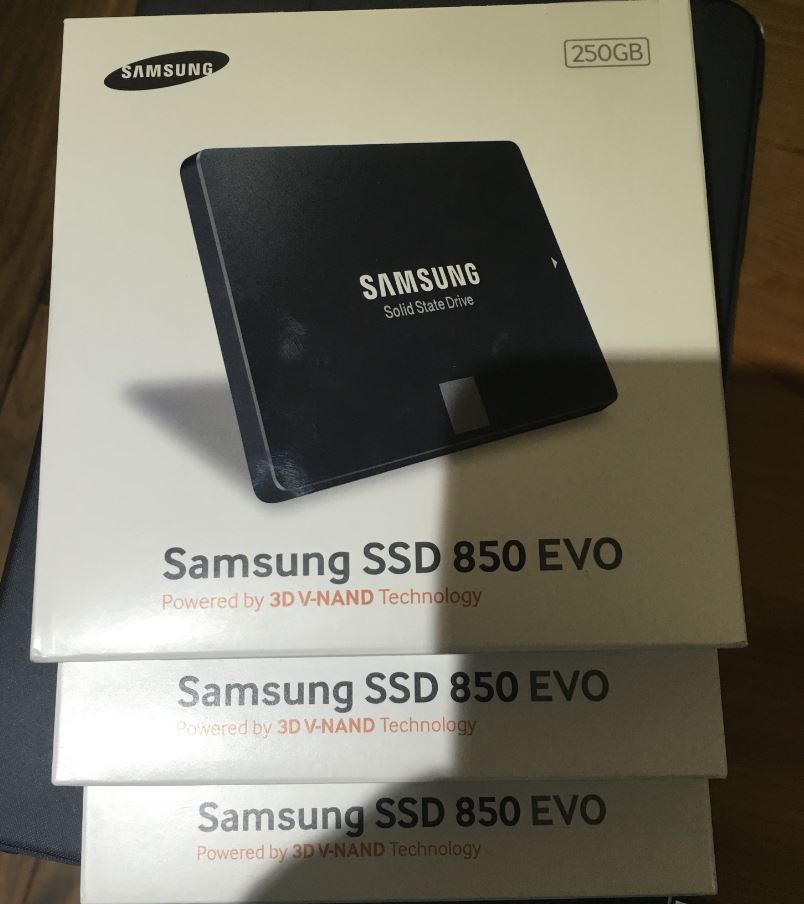
As I already had a normal (Hybrid) VSAN implementation using SSD+HDD in my management vSphere cluster, the plan was to keep the existing SSD’s as caching tier and replace the current HDD’s with high capacity SSD drives. So I bought 3 new Samsung 850 EVO 256GB drives from Amazon (here)                                       Capture

All Flash VSAN Setup

Given below are the typical steps involved in the processes to implement All Flash VSAN within the VMware cluster (I’m using the 3 node management cluster within my lab for the illustration below)

  1. Install the SSD drives in the server – This should be easy enough. If you are doing this in a production environment, you need to ensure that the capacity SSD’s (similar to all other components in your VSAN ready nodes)  are in the VMware HCL
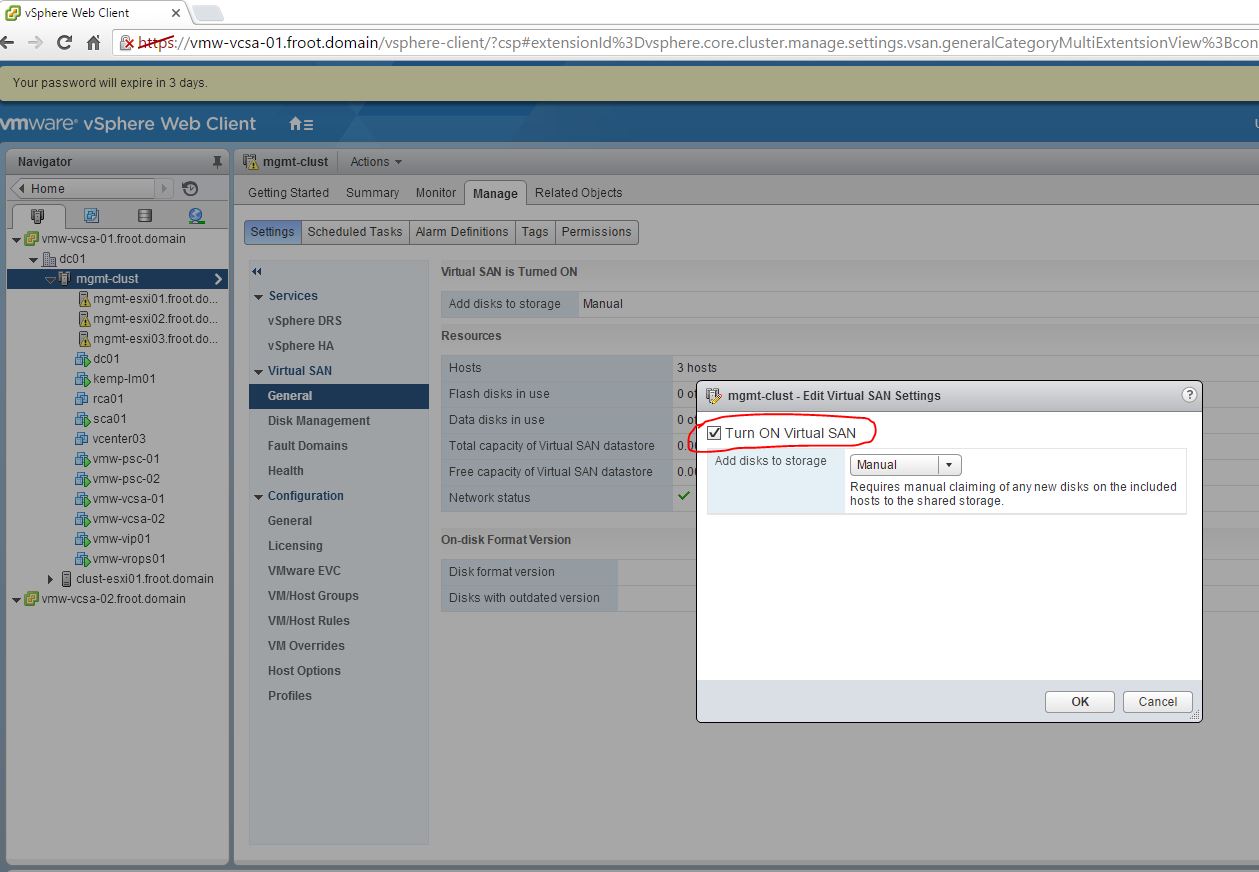
  2. Enable VSAN on the cluster – Need to be done on the web client      1 - Enable VSAN
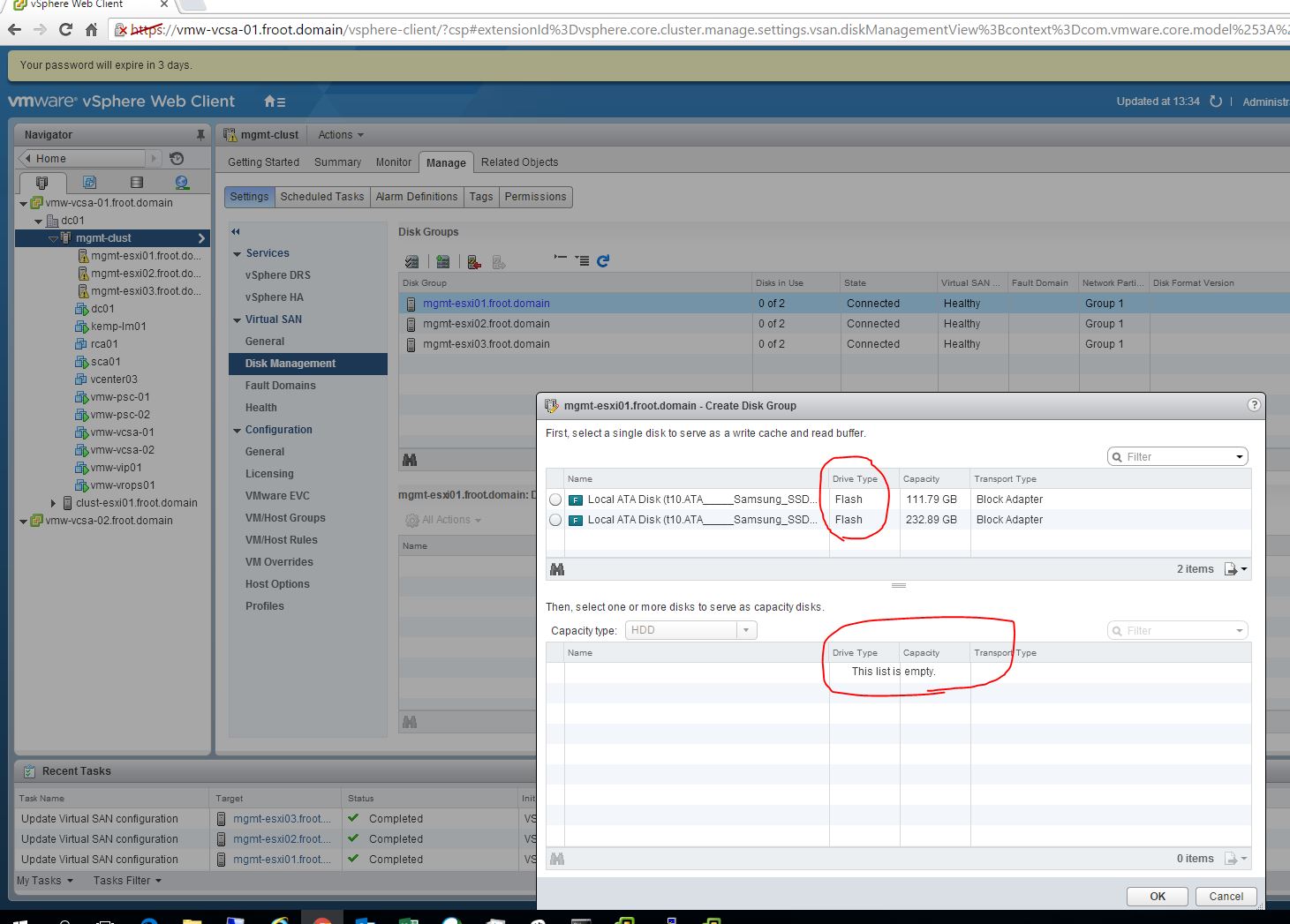
  3. Verify the new SSDs are available & recognised within the web client – All SSD’s are recognised as caching disks by default.              0 - Default disk assignment  2 - all caching
  4. Manually tag the required SSD drives as capacity disks VIA COMMANDLINE for them to be recognised as capacity disks within VSAN configuration – This step MUST be carried out using one the ways explained below and until then, SSD disks WILL NOT be available to be used as capacity disks within an all flash VSAN otherwise. (There currently is no GUI option on the web client to achieve this and cli must be used)
    1. Use esxcli command on each ESXi server
      1. SSH in to the ESXi server shell
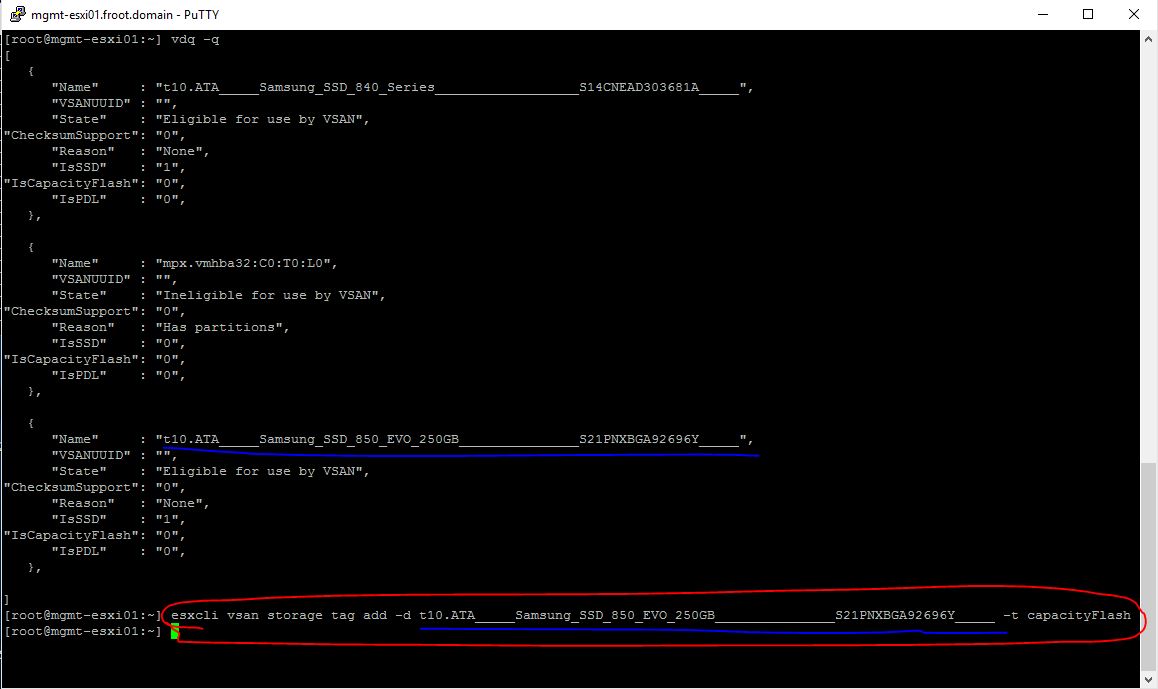
      2. Use the vdq -q command to get the T10 SCSI name for the capacity SSD drive (Also verify “IsCapacityFlash” option is set to 0) 3 SSH
      3. Use the “esxcli vsan storage tag add -d <SCSI T10 name of the disk> -t capacityFlash” command to mark the disk as capacity SSD.   4 ESXCLI
      4. Use the vdq -q command to query the disk status and ensure the disk is now marked as “1” for “IsCapacityFlash” 5 esxcli verify
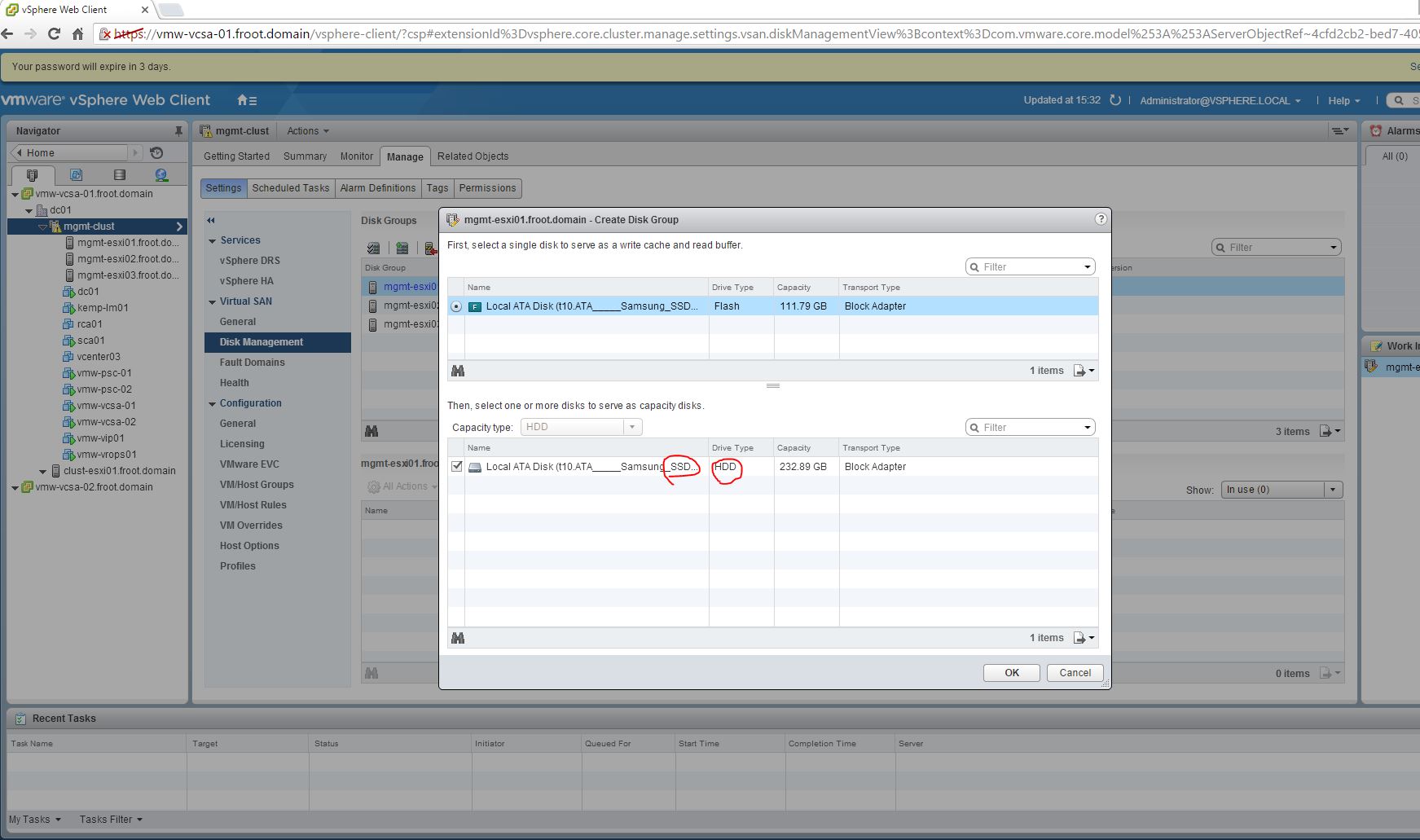
      5. If you now look at the Web client UI, the capacity SSD disk will now have been correctly identified as capacity (note the drive type changed to HDD which is somewhat misleading as the drive type is still SSD) 8.1 GUI
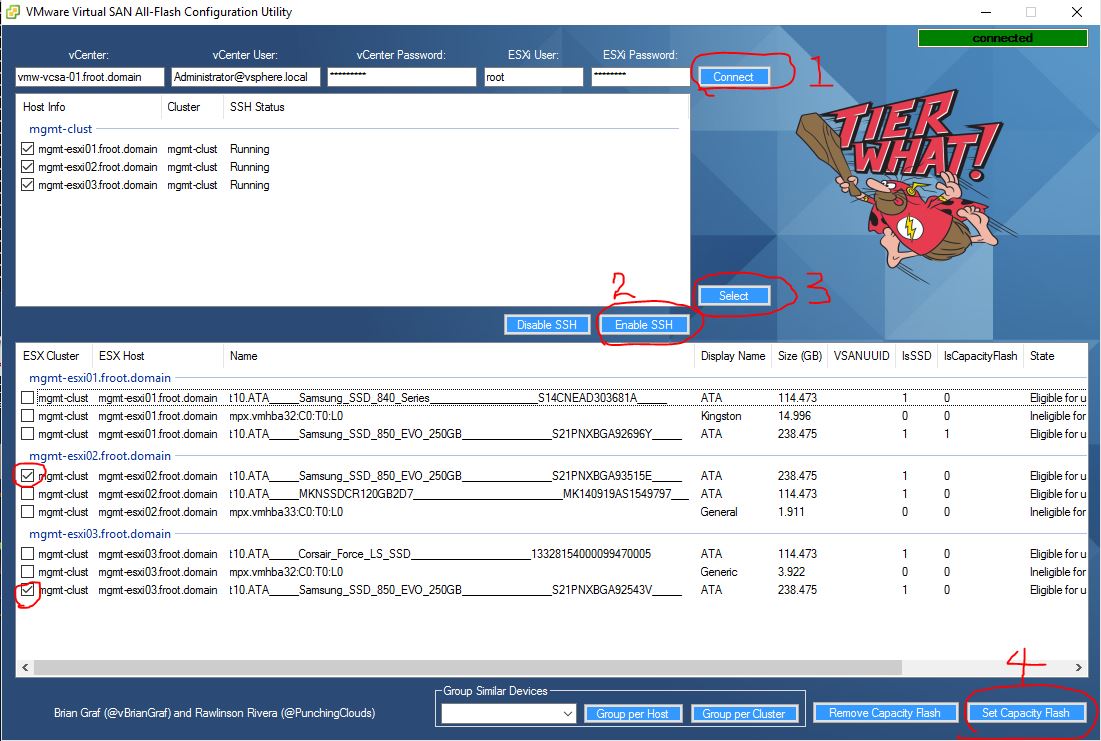
    2. Use the “VMware Virtual SAN All-Flash Configuration Utility” software – This is a 3rd party tool and not an officially supported VMware tool but if you do not want to manually SSH in to the ESXi servers 1 by 1, this software could be quite handy as you can bulk tag on many ESXi servers all at the same time. I’ve used this tool to tag the SSD’s in the next 2 servers of my lab in the illustration below. xx - Use VMware Virtual SAN all-flash configuration utility
  5. Verify capacity SSD across all hosts – Now that all the capacity SSD’s have been tagged as capacity disks, verify that the web client sees all capacity SSD’s across all hosts                                                9 Disk group manual
  6. Create the disk groups on each host – I’m opting to create this manually as shown below 9 Disk group manual 10 - Verify disk groups
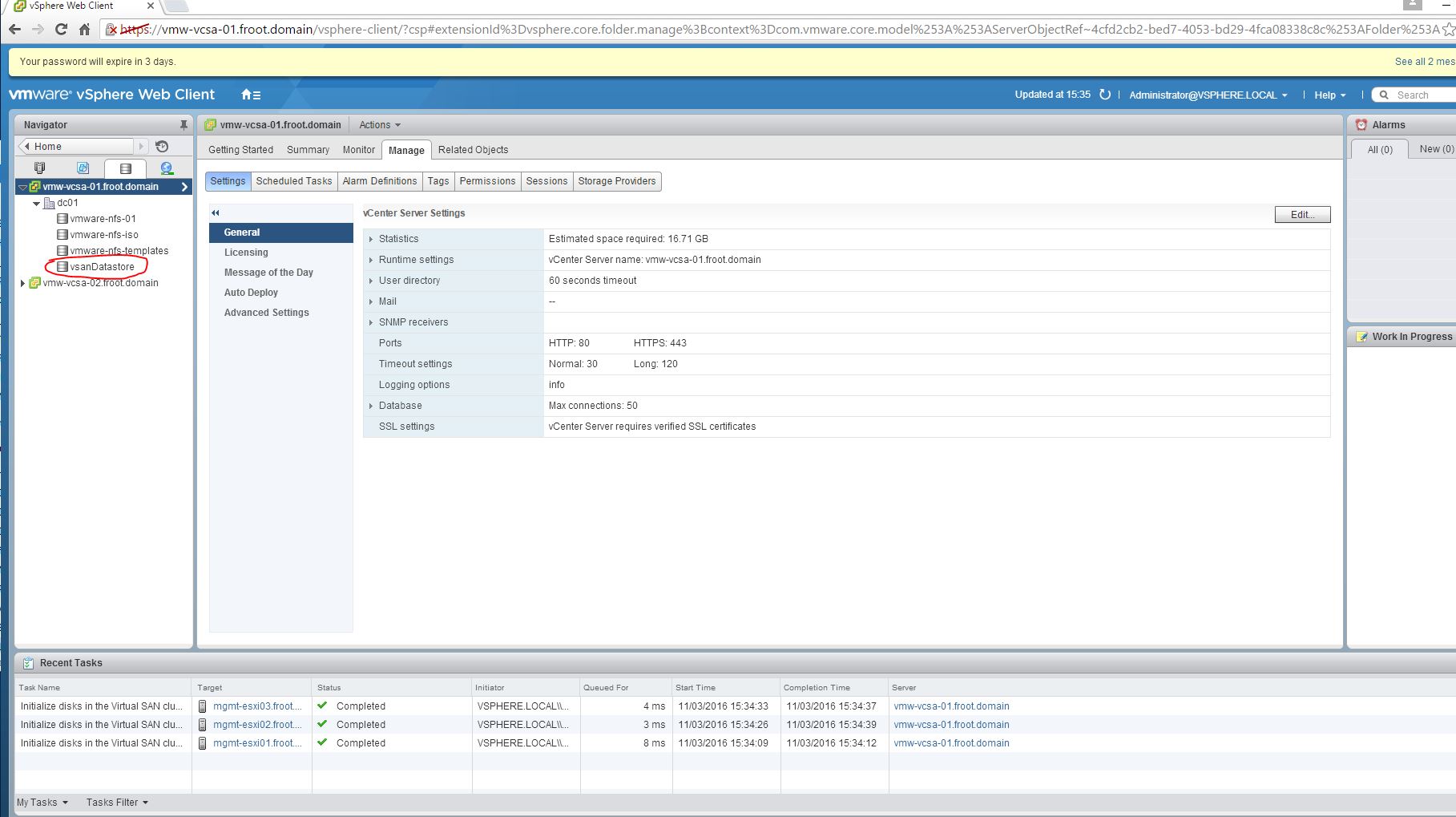
  7. Verify the VSAN datastore now being available and accessible 11 - VSAN datastore active

There you have it. Implementing all flash VSAN requires manually tagging the SSDs as capacity SSDs for the time being and this is how you do it. I may also add that since the all flash VSAN, my storage performance has gone through the roof in my home lab which is great too. However this is all done on Whitebox hardware and not all of them are fully on VMware HCL….etc which makes those performance figures far from optimal. It would be really good to see performance statistics if you have deployed all flash VSAN in your production environment.

Cheers

Chan


VMware vExperts 2016 been announced!!

vexpert_logo

VMware vExperts 2016 has just been announced by VMware and glad to say I’ve made the cut. I’m really honoured to have been selected this year again (following on from 2014) as there are lots of cleverer people than myself (including some VCDX’s) that aren’t necessarily selected as vExperts. So thank you VMware for recognising the little bit I’ve done (and will continue to do)  🙂

Capture

The list of global vExperts 2016 announced can be found in the link below.

http://blogs.vmware.com/vmtn/2016/02/vexpert-2016-award-announcement.html

VMware vExperts is VMware’s global evangelism and advocacy programme and is held in high regards within the community due to the expertise of the selected vExperts and their contribution towards enabling and empowering customers around the world with their virtualisation and software defined datacentre journeys. The candidates are judged on their contribution to the community through activities such as community blogs, personal blogs, participation of events, producing tools…etc.. and in general, maintaining their expertise in related subject matters. vExperts typically get access to private betas, free licenses, early access product briefings, exclusive events, free access to VMworld conference materials, and other opportunities to directly interact with VMware product teams which is totally awesome and I return, help us to feed the information back to our customers…

Finally, congratulations for all the other fellow vExperts 2016 too.. Keep up the good work…!!

Cheers

Chan

FlexPod: The Joint Wonder From NetApp & Cisco (often with VMware vSphere on Top)

Logo

During attending the NetApp Insight 2015 in Berlin this week, I was reminded of the monumental growth in the number of customers who has been deploying FlexPods as their preferred converged solutions platform, which now celebrates its 5th year in operation. So I thought I’d do a very short post on it to give you my personal take of it and highlight some key materials.

FlexPod has been gaining lots of market traction as the preferred converged solution platform of choice for many customers of over the last 4 years. This has been due to the solid hardware technologies that underpins the solution offering (Cisco UCS compute + Cisco Nexus unified networking + NetApp FAS range of Clustered ONTAP SAN). Often, customers deploy FlexPod solutions together with VMware vSphere or MS Hyper-V on top (other hypervisors are also supported) which together, provide a complete, ready to go live, private and hybrid cloud platform that has been pre-validated to run most if not all typical enterprise data center workloads. I have been a strong advocate of FlexPod (simply due its technical superiority as a converged platform) for many of my customers since it’s inception.

Given below are some of the interesting FlexPod validated designs from Cisco & NetApp for Application performance, Cloud and automation, all in one place.

There are over 100+ FlexPod validated designs available in addition to the above, and they can all be found below

There is a certified, pre-validated, detailed FlexPod design and deployment guide for almost every datacentre workload and based on my 1st hand experience, FlexPod with VMware vSphere has always been a very popular choice amongst most customers as things just work together beautifully. Given the joint vendor support available, sourcing support from a single vendor for all tech in the solution is easy too. I also think customers prefer FlexPod over other similar converged solutions, say VBLOCK for example, due to the non prescriptive nature of FlexPod whereby you can tailor make a FlexPod solution that meet your need (a FlexPod partner can do this for a customer) which keeps the costs down too.

There are many FlexPod certified partners available who can size, design, sell and implement a FlexPod solution for a customer and my employer Insight is also one of them (in fact we were amongst the first few partners to get FlexPod partnership in the UK). So if you have any questions around the potential use of a FlexPod system, feel free to get in touch directly with me (contact details on the About Me section of this site) or through the Flexpod section of the Insight Direct UK web site.

Cheers

Chan